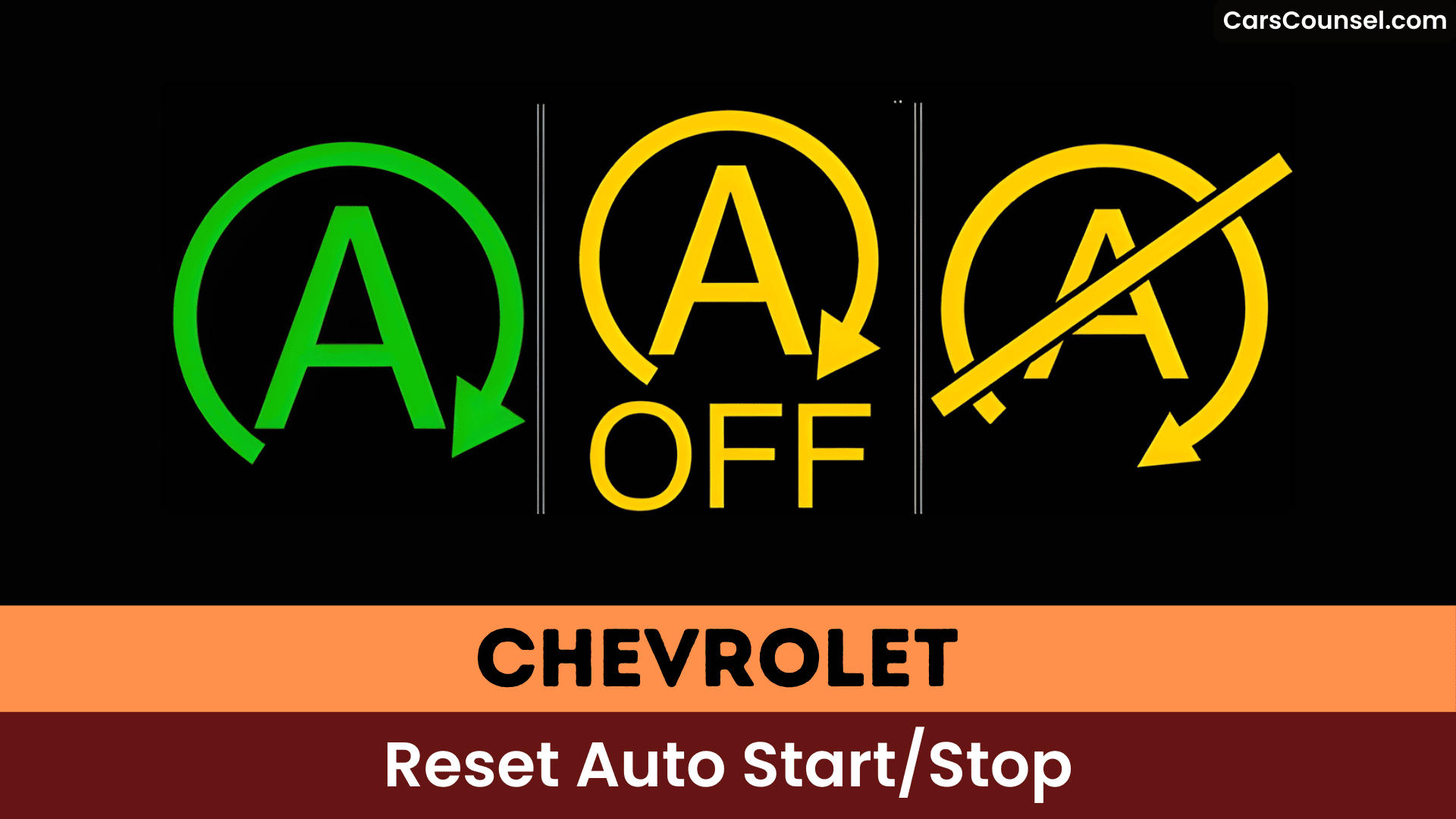
When you’re at a stoplight in your Chevrolet Silverado, the engine shuts off automatically thanks to Auto Stop/Start technology, but you spot the circled “A” button on the dash. Press it once, and the LED turns off, disabling the feature for that drive. You’ll need to repeat this each time you restart, though—discover why it resets and other fixes next.
Quick Navigation
Key Takeaways
- Press the Auto Stop/Start Off (circled “A”) button; it disables Stop/Start for the current ignition cycle only.
- If no button exists, consult the Chevrolet Owner’s Manual for model-specific disable procedures and menus.
- Use a plug‑in OBD‑II smart disabler to toggle Stop/Start persistently; it’s plug‑and‑play and reversible before dealer visits.
- Shifting to L (Low) or using gentle brake inputs can prevent Auto Stop engagement in traffic for some Chevy models.
- Faults, low battery charge, A/C load, or tow/haul mode will disable or prevent reactivation; diagnose battery and clear codes with professional tools if needed.
How Auto Stop/Start Technology Works in Chevrolet Vehicles
Chevrolet’s Auto Stop/Start technology automatically shuts off your engine when you come to a complete stop, boosting fuel efficiency. Intelligent sensors monitor battery charge, climate control, and other conditions to engage or disengage it, ensuring ideal engine performance.
When it activates, your tachometer needle moves to the “Auto Stop” position, signaling the engine is off while you’re stationary.
Release the brake pedal, and it restarts seamlessly for smooth driving. Low battery voltage or tow/haul mode inhibits the feature, preventing shutdowns to maintain reliability.
Identifying If Your Chevrolet Has Auto Stop/Start
Check your Chevrolet’s tachometer for an “Auto Stop” position and watch if the engine shuts off at stops and restarts when you release the brake pedal—these confirm the feature’s presence.
Look for a disable button near the transmission, marked with a circled “A” and often an “off” label, which indicates you can deactivate it.
Consult your owner’s manual or test under normal conditions, as the system won’t engage with low battery or in tow/haul mode.
Vehicle Identification
Identify if your Chevrolet has Auto Stop/Start by spotting the “Auto Stop” position on the tachometer, which appears when the engine shuts off at stops.
Check for a dashboard button marked with a circled “A” that lets you disable Auto Stop/Start temporarily, and note an LED on that switch indicates its status.
Many newer Chevrolets (including 2020 LT configurations) offer this feature, but availability varies by model and engine type.
Consult your owner manual to confirm presence, exact behavior, and disabling instructions.
If the engine cuts at stops and restarts when you release the brake, it’s equipped.
Disable Indicators
Spot the circled “A” button on your Chevrolet’s dashboard to confirm it disables Auto Stop/Start temporarily; an unlit LED on the switch shows it’s off.
Your engine shuts off at complete stops and restarts when you release the brake pedal, confirming the feature’s active status. The tachometer’s “Auto Stop” position signals engagement during shutdown.
It won’t activate if climate control demands AC power. Check your owner’s manual or equipment list for confirmation.
Use these disabling tips and understand indicator meanings to master the system.
Locating the Auto Stop/Start Deactivation Button
| Model Check | Button Location | Disable Method |
|---|---|---|
| Tahoe/Suburban | Center console | Press circled “A” |
| Silverado | Dashboard | Press or shift L6 |
| General Chevy | Varies | Manual or device |
Temporarily Disabling Auto Stop/Start With the Button
Press the Start/Stop deactivation button (the circled “A”) once after you start the car to temporarily disable Auto Stop/Start.
The switch’s LED or the instrument-cluster “Auto Stop” indicator will change to show the system is off, so confirm the light goes out or the tachometer no longer points to “Auto Stop.”
Remember the setting resets at the next ignition cycle, so you’ll need to press the button each time you restart the vehicle.
Locate Start/Stop Button
Locate the Start/Stop button—usually marked with a circled “A”—on the center stack or below the climate controls and press it once after you start the vehicle to temporarily disable Auto Stop/Start for that ignition cycle.
You’ll often find the button plainly visible, but Start/Stop confusion happens when some models omit a dedicated switch or place it low on the dash, reducing Button visibility.
If the button’s absent, disabling requires other steps (see other sections); otherwise press the switch each time you start the car since the deactivation doesn’t persist across ignition cycles.
Press Button Once
Tap the circled “A” button once after starting the car to turn Auto Stop/Start off for that ignition cycle, then drive as usual knowing the system will remain disabled only until you shut the vehicle off.
Pressing that dashboard button temporarily disables auto start/stop, letting you avoid engine shutdown during stop-and-go traffic and preserve the auto start/stop benefits when you want them retained on future drives.
Remember the disablement isn’t permanent—you must press the button each time you start the vehicle if your model includes the switch.
Use temporary disablement tips: check the LED and consult your owner’s manual.
Verify Disable Indicator
Want to confirm the system actually turned off? Press the dashboard button marked with a circled “A”; when Auto Stop/Start is disabled for that ignition cycle, an LED on the switch will change state to indicate it’s off.
Check the instrument cluster — some models show “Auto Stop” status on the tachometer — and verify the button’s LED remains lit (or unlit per your model) while the engine stays running at stops.
If no dedicated switch exists, feature concerns may require using transmission/workarounds or aftermarket modules to manage auto stop/start benefits versus comfort.
Resetting Auto Stop/Start After Each Ignition Cycle
| Action | Result | Notes |
|---|---|---|
| Press “A” button | Disabled for cycle | LED indicates status |
| Shift to L6 | May bypass stop/start | Temporary method |
| Aftermarket disabler | Persistent disable | Requires installation |
Shifting to L Mode to Bypass Auto Stop/Start
Shift your Chevrolet into L (Low) mode to bypass the auto start/stop feature, keeping the engine running at stops. This prevents automatic engine shutdowns that occur in Drive at complete stops.
You’ll find L mode advantages in stop-and-go traffic, where frequent halts would otherwise trigger the system. Push the “+” on your shifter to the highest gear (e.g., L6, L9, or L10, depending on your transmission) so it shifts automatically like Drive.
Use this as a temporary workaround. Remember, you’re now doing manual shifting—the vehicle won’t upshift on its own.
Installing a Plug-and-Play Start/Stop Disabler Harness
Install a plug-and-play start/stop disabler harness in your Chevrolet by following the harness installation steps, which involve unplugging the factory connector—often behind the dash trim, at the hood latch, or near the OBD-II port—and plugging in the device with minimal tools.
You’ll find harness placement options like securing it behind the auto start/stop switch with zip ties, along the radiator rail, or tucked into dash panels for a clean, reversible setup.
This approach permanently disables the feature without coding changes, and you can remove it anytime to preserve your warranty.
Harness Installation Steps
When you’re ready to add a plug-and-play start/stop disabler harness, begin by locating the vehicle’s OBD-II port—usually under the dash near the driver’s seat—and prepare to connect the harness snugly so it establishes a reliable link.
Next, plug it in securely, then follow the manufacturer’s instructions for any programming or settings configuration—don’t skip harness compatibility checks to verify it fits your Chevrolet model.
Start the vehicle to test; the auto start/stop should stay disabled. If issues arise, use harness troubleshooting tips like re-seating connections or checking videos for guidance.
You’re set for hassle-free drives.
Harness Placement Options
Because you’ll want the harness both accessible and out of the way, choose a mounting spot that keeps the plug secure while leaving enough slack for dashboard panels to close without pinching wires. Consider installation location preferences: behind the switch, inside the fuse panel, or tucked under trim; each preserves harness compatibility considerations and allows plug-and-play removal without changing factory settings.
| Location | Pros |
|---|---|
| Behind switch | Fast, preserves trim |
| Fuse panel | Hidden, secure |
| Under trim | Accessible, removable |
Step-by-Step Guide to Permanent Disabling on Equinox
If you want to permanently disable the Equinox’s Auto Start/Stop without altering factory calibrations, a plug‑in OBD‑II smart disabler like Hypertech’s PowerStay lets you quickly toggle the feature and restore stock operation by unplugging it before dealer visits.
You’ll choose from several disabler device options and learn from user experiences when deciding which fits your needs. Installation is plug‑and‑play and reversible, so warranty visits aren’t a problem.
Follow these basic steps:
- Plug the smart disabler into the OBD‑II port.
- Use the device to toggle Auto Start/Stop off.
- Unplug before dealer service to restore factory behavior.
Common Reasons Auto Stop/Start Fails to Engage
Your Chevrolet’s Auto Start/Stop fails to engage for several common reasons.
Low battery voltage or a weak battery monitor can block engagement to avoid failed restarts and communication faults with modules.
Environmental factors like high ambient temperatures or heavy A/C use may inhibit the system to protect performance.
Tow/haul mode disables Auto Stop/Start automatically to maintain power under load.
User habits such as heavy braking or keeping constant brake pressure can prevent activation; light, steady brake release often allows it to engage.
Active system faults or warning lights will also stop Auto Start/Stop from operating.
Diagnosing Battery Issues Affecting Auto Stop/Start
When diagnosing battery-related causes of an Auto Stop/Start failure, start by checking the battery’s resting and charging voltages and the condition of its terminals, since low resting voltage or poor charging can disable the system to avoid failed restarts.
You’ll want to perform voltage testing methods and follow battery maintenance tips to isolate issues. Check for loose or corroded terminals and test while at rest and under charge.
If codes like U01B0 appear, suspect communication or monitor module problems tied to battery health. Consider repeat short-trip charging deficits and replace or service if tests show marginal results.
- Test resting voltage (12.4–12.7V target).
- Inspect and clean terminals; tighten grounds.
- Load/charge test if voltages are inconsistent.
Clearing Diagnostic Codes Like U01B0 and P1101
Diagnostic codes like U01B0 (Battery Monitor Module communication loss) and P1101 (Mass Air Flow Sensor issue) often disable Chevrolet’s Auto Stop/Start; you’ll need advanced tools beyond basic scanners for reliable clearing, as simple attempts frequently fail.
You should use professional diagnostic tools to read module communications, freeze-frame data, and perform relearns; basic scanners may not clear U01B0 or restore Battery Monitor Module functions.
Check and perform sensor maintenance on the MAF (cleaning, wiring, and intake leaks) before clearing P1101.
If codes persist, a battery disconnect or dealer-level equipment may be required to reset systems and auto start/stop.
Impact of Auto Stop/Start on Battery and Starter Life
Chevrolet’s Auto Stop/Start feature increases wear on your starter motor through frequent engine cycling and adds strain to the battery from repeated restarts.
You should expect more starter engagement and plan battery maintenance to protect starter longevity and battery health. Vehicles use stronger batteries (often AGM) and reinforced electrical systems, but low voltage, poor grounding, or neglected connections will shorten battery life and impair restarts.
Monitor state-of-charge and terminal condition, and follow service intervals.
- Check battery health regularly.
- Secure and clean connections.
- Replace with OEM-spec or AGM when required.
Software Updates and Their Effect on Feature Functionality
Software updates can alter your Chevrolet’s auto start/stop functionality, sometimes enhancing it or triggering malfunctions like clunky re-engagements that mimic stalling.
You’ve likely heard user experiences where dealer updates re-engage the feature awkwardly or spawn software glitches affecting climate control and radio.
These changes can ripple into other systems, demanding vigilance post-update. Monitor your auto start/stop closely afterward.
If issues arise, reboot by disconnecting the battery—this often clears glitches and restores performance, as community fixes confirm.
Professional Diagnostics for Persistent Auto Stop/Start Problems
If persistent Auto Stop/Start issues continue after software updates, have a technician run professional diagnostics so they can check button location options and any related switch wiring in your vehicle.
They’ll use advanced electrical diagnostics to monitor real‑time data from the Battery Monitor Module and other modules (to catch codes like U01B0 and intermittent communication errors).
Expect a thorough battery, connection, and charging‑system inspection and possible reprogramming or component replacement if diagnostics show low voltage or stressed parts.
Button Location Options
Locate the auto start/stop disable button—often marked with a circled “A” or arrow around an engine icon—on your Chevrolet’s dashboard, typically near the climate controls, center console, or instrument panel.
Check your model’s feature location and button functionality: press it once to disable; the LED turns off, but you’ll reactivate each start.
If absent, try these options:
- Shift to L6 gear to block auto-stop.
- Install aftermarket harnesses for permanent disable.
- Consult forums for model-specific tips.
Persistent issues? Seek professional diagnostics.
Electrical Diagnostic Steps
If basic troubleshooting doesn’t resolve persistent auto start/stop issues on your Chevrolet, use a professional diagnostic tool to scan for fault codes like U01B0, which signals lost communication with the Battery Monitor Module.
Use the tool to capture intermittent communication issues and stored codes that basic scanners miss.
Check battery health and voltage under load, since low voltage or poor battery health can disable the system.
Inspect battery terminals and ground connections for corrosion or looseness that cause intermittent failures.
If codes persist or resets don’t help, perform a controlled system reset or consult a professional technician for in-depth diagnosis.
Frequently Asked Questions
How Do I Reset My Start-Stop System?
Disconnect the positive battery cable for at least 15 minutes, reconnect, drive briefly to recalibrate, and if needed run auto start stop troubleshooting with an OBD-II scanner or follow the reset procedure in your owner’s manual.
How Do I Permanently Turn off My Chevy Auto Stop?
Strike while the iron’s hot: you can permanently disable Chevy Auto Stop by installing a plug‑in disabler or bypass harness (e.g., AutoStop Eliminator) or an OBD‑II module, preserving auto stop benefits without hurting vehicle performance.
Why Is My Auto Start-Stop Not Working?
Your Auto Start‑Stop may not work because of battery issues (low voltage or weak/uncertain charge) or software glitches (control-module resets/updates); climate, tow/haul, or comfort settings can also inhibit the system.
What Causes the Auto Start-Stop Light to Come On?
Don’t ignore the warning lights—they’re your vehicle’s cry for attention. Your auto start-stop indicators light up due to system malfunction reasons like low battery, extreme temps, A/C use, tow/haul mode, or cold engine. Check battery health; diagnose soon.
Conclusion
You can picture the dashboard “A” button like a tiny off switch for an impatient engine—press it to stop the auto stop/start from silencing your Chevrolet, but remember it wakes back up with the next ignition cycle, so you’ll press it again each time you start the car; if your model lacks the button, check the owner’s manual or a dealer for alternate methods to disable or update the system.

