
You’ve swapped your Mazda’s battery, yet the i-Stop Auto Start/Stop stays dormant.
Park on a flat surface, turn off all electrical loads, and switch ignition to ON without starting. Long-press the i-Stop OFF switch for three seconds.
Start the engine, press it once, and watch for the flashing indicator, but you’ll need to idle longer to confirm success.
Quick Navigation
Key Takeaways
- After battery replacement, perform the i‑Stop reinitialization sequence (ignite ON, long‑press i‑Stop OFF, start engine, press i‑Stop OFF) to force a reset.
- Ensure battery State of Charge (BAT_SOC) is ≥75% and use the correct EFB/AGM battery type to prevent i‑Stop disablement.
- Allow the engine to idle with all electrical loads off for about 10 minutes after the reset so the system can stabilize and stop the i‑Stop indicator flashing.
- Verify alternator charging (about 13.5–14.5V) and clean/tighten terminals; low charging or poor connections will prevent i‑Stop operation.
- If the amber i‑Stop warning light stays on or flashes after DIY steps, have an Authorized Mazda Dealer scan for BAT_SOC and fault codes and perform dealer initialization.
Why the Auto Start/Stop (i‑Stop) Might Stop Working After a Battery Change
Although the i‑Stop system usually resumes after simple battery work, it often stops functioning after a battery replacement or disconnection because the vehicle’s battery-management and i‑Stop control modules lose their learned battery state and require a reinitialisation sequence.
After a battery change the i‑Stop control modules lose their learned battery state and need reinitialisation.
You’ll see *i Stop functionality issues* due to loss of BAT_SOC and control-module memory, and *battery replacement effects* include reduced CCA readings and failed self‑checks.
Step 1: warm engine and minimise electrical load.
Step 2: perform ignition/i‑Stop button reinitialise procedure (long‑press sequence) or dealer diagnostic reset.
Step 3: allow charging/driving time for BAT_SOC to stabilise.
Required Tools and Safety Precautions Before You Begin
Park your Mazda on a flat surface and warm up the engine to operating temperature before starting.
Turn off all electrical loads like the radio and air conditioning to prevent battery drain, and make sure you can access the i-stop OFF switch.
Prepare a diagnostic tool if the manual reset fails, and review your owner’s manual for model-specific i-stop details.
Essential Tools List
| Item | Purpose | Notes |
|---|---|---|
| Fully charged battery | Guarantees i-Stop initialization | Check SOC first |
| FORScan scan tool | Troubleshooting, system reset | Mazda-compatible |
| Gloves & safety glasses | Personal protection | Wear during battery work |
| User manual | Model-specific instructions | Verify procedures |
| Flat, ventilated space | Safe working area | Park securely |
Key Safety Measures
Before resetting Mazda’s auto start/stop (i-Stop) system, warm up the engine to ideal operating temperature to prevent errors.
Turn off all electrical loads (radio, A/C) and switch ignition off before starting to minimize battery drain and avoid accidental activation.
Verify the battery is fully charged and compatible with i-Stop to reduce risk of system malfunctions.
Keep an OBD‑II diagnostic tool ready to read/clear error codes immediately after the reset.
Follow safety protocols: engage parking brake, park on level ground, close doors/windows, and ascertain no occupants manipulate controls during the procedure to prevent unintended restarts.
Confirming Battery Type: OEM, EFB, AGM and Why It Matters
Confirm the installed battery type by reading the label and verifying the presence of a current-sensor and manufacturer part number to determine OEM, EFB, or AGM specification.
Confirm *EFB* if the vehicle has a stop/start system because EFBs are specified to tolerate frequent discharge/recharge cycles and support i‑Stop operation more reliably than standard flooded batteries.
Note that AGM provides higher performance in extreme conditions but may be unnecessary or incompatible where Mazda originally specified an EFB, so follow Mazda OEM guidance.
Battery Types Defined
Start by identifying the factory-specified battery type for your Mazda, because using the correct category—OEM-specified flooded, *EFB* (Enhanced Flooded Battery), or *AGM* (Absorbent Glass Mat)—directly affects i‑Stop behavior, charge acceptance, and cycle life.
OEM batteries guarantee ideal compatibility with i-Stop systems.
Choose EFB for stop/start demands; it outperforms standard lead-acid in repeated cycles and durability.
Select AGM for extreme conditions and advanced electrical loads, though it may exceed basic needs.
Avoid mismatched aftermarket options to prevent i-Stop failure.
Adopt proper maintenance practices like electrolyte checks to maximize battery longevity.
I-Stop Compatibility Issues
When you’re diagnosing i‑Stop compatibility, verify the exact factory-specified battery category (OEM, *EFB*, or *AGM*) and then match replacement units to that spec: check the vehicle’s service sheet or dealer data for the original battery type and part number, inspect the battery case labeling for EFB/AGM markings and start‑stop ratings, and measure resting voltage and cold cranking amps to confirm a like‑for‑like electrical capacity.
You’ll optimize i-Stop with OEM or *EFB* batteries, which handle repeated starts better than standard aftermarket or AGM types; mismatches disable the system and hurt fuel efficiency.
Follow battery maintenance tips like checking electrolyte levels regularly to sustain performance and avoid activation failures.
Preparing the Vehicle: Warm‑up, Electrical Loads and Ignition Position
Prepare your Mazda for i-Stop reset by warming up the engine to its ideal temperature, which promotes successful activation.
Achieve maximum engine temperature first, as it improves electrical efficiency and system readiness.
Turn off all electrical loads—radio, A/C—to minimize battery drain and guarantee power availability.
Switch the ignition off completely, allowing the system to reset properly.
Turn ignition on without starting the engine, then long-press the i-Stop OFF switch for 3 seconds within 5 seconds.
Start the engine to confirm reset via flashing i-Stop indicator.
Step‑By‑Step I‑Stop Reset Procedure (Long‑Press Method)
Switch the ignition to the “ON” position without starting the engine.
Long‑press the i‑Stop OFF switch for 3 seconds within 5 seconds of ignition ON.
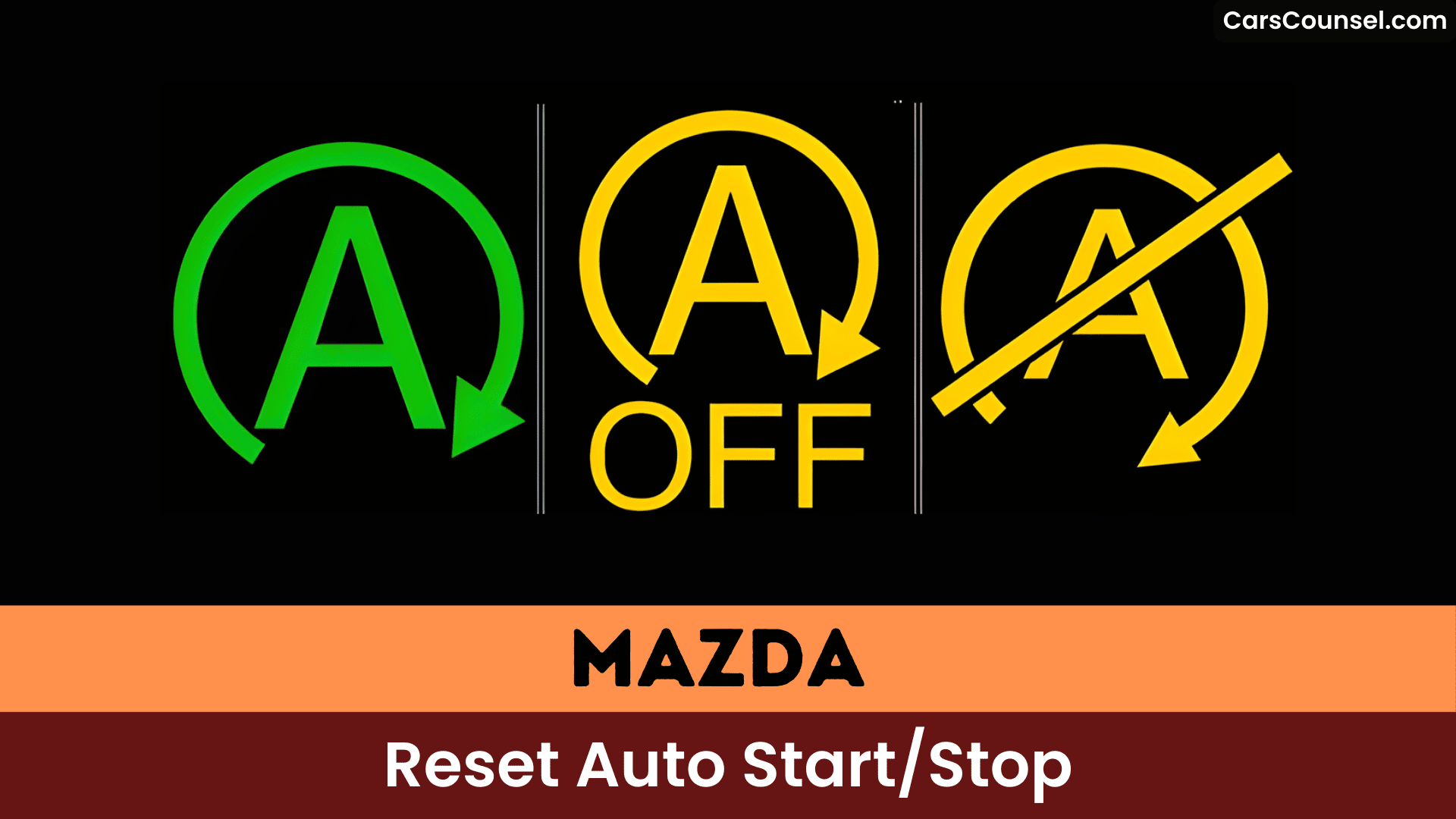
Start the engine and immediately press the i‑Stop OFF switch once; confirm the i‑Stop indicator (green) flashes and remains flashing.
Allow the engine to idle with all electrical loads off for 10 minutes or until the i‑Stop indicator turns off, indicating successful relearn of i Stop features and restoration of i Stop benefits.
If flashing persists after idling, stop the engine for 1–2 minutes, restart and drive to verify normal i‑Stop operation.
Verifying the I‑Stop Indicator: Colors, Flashes and What They Mean
Review i-Stop functionality overview: the green light signals readiness; persistent flashing means standby or conditions block engagement—idle or drive several minutes for stabilization.
Check indicator light meanings: amber light indicates malfunction; flashing amber requires diagnostics.
If green flashes consistently, reset again or scan for issues.
Idle and Drive‑Cycle Steps After Reset: How Long to Idle and Test Drive Tips
- Switch off the engine for 1-2 minutes, then restart to verify reset effectiveness.
- Monitor the i-Stop indicator; if it flashes, repeat the idle duration and restart.
- Drive 1-2 miles under normal drive conditions to test activation.
- Confirm i-Stop engages; full learning may take repeated cycles if needed.
Troubleshooting When the Indicator Keeps Flashing
After completing the idle and drive‑cycle checks, proceed with a focused troubleshooting routine when the i‑Stop indicator keeps flashing: confirm the engine is at normal operating temperature and disable all electrical loads (A/C, radio, lights).
Then run a continuous idle for up to 10 minutes while observing the indicator; if flashing persists, turn the engine off for 60–120 seconds, restart, and repeat the idle test once more.
Then drive 1–2 miles under steady, moderate throttle to allow the i‑Stop logic to re-evaluate system readiness.
If the flashing indicator continues after this i Stop troubleshooting, repeat the sequence once and verify battery/alternator health; persistent faults require professional diagnostics.
When to Check Battery State‑of‑Charge (BAT_SOC) and How to Read It
Check BAT_SOC after any battery replacement or after the battery’s been disconnected, and again if the i‑Stop indicator is flashing to confirm the charge state that can block i‑Stop activation.
Read BAT_SOC from the vehicle diagnostics display or Mazda service scan tool (follow the instrument cluster/service menu steps or connect an OBD-II scanner that reports battery SOC).
If BAT_SOC is below ~75% schedule charging or a controlled charge cycle and recheck before troubleshooting further.
Check Triggers
- Check BAT_SOC with a diagnostic tool or onboard display; record percentage and health flags for *battery maintenance* and i Stop benefits.
- If BAT_SOC is low, drive to recharge or charge externally until BAT_SOC reaches the required threshold for i-Stop operation.
- After replacement/disconnection, allow the new battery to fully charge before expecting normal i-Stop function.
- Confirm battery type is EFB/compatible to avoid repeated disable triggers.
Reading Method
When i‑Stop isn’t engaging, measure the Battery State‑of‑Charge (BAT_SOC) immediately using a Mazda‑compatible diagnostic tool and record the displayed SOC percentage and any battery‑related flags.
Confirm BAT_SOC exceeds 75% for peak i-Stop performance; recharge if low to support battery maintenance.
Connect the scanner to the OBD-II port, navigate to the battery management system, and retrieve live BAT_SOC data.
After battery replacement, monitor BAT_SOC regularly as recalibration takes time.
Use diagnostic tools for precise readings during troubleshooting to prevent i-Stop inhibition and verify system readiness.
Charger and Alternator Checks: Ensuring the Charging System Is Healthy
Because the i‑Stop routine depends on a reliably charged battery and steady charging voltage, begin the charger and alternator checks with a measured, stepwise approach.
> Because the i‑Stop routine depends on a reliably charged battery and steady charging voltage, begin the charger and alternator checks with a measured, stepwise approach.
Follow these battery maintenance tips and alternator testing techniques:
- Fully charge the battery before resetting; test voltage with a multimeter—below 12.6V means recharge or replace.
- Check alternator output during operation; confirm 13.5-14.5V to sustain charge.
- Inspect terminals for corrosion or looseness, which impair charging and i-Stop.
- If issues persist, probe wiring and connections for faults in the charging system.
Differences by Mazda Model and Engine (What May Vary)
Note that i-Stop reset procedures vary by Mazda model and engine type.
For your CX-5 or CX-50, follow the standard sequence of warming the engine, long-pressing the i-Stop OFF switch within 5 seconds of ignition ON, then idling until the green indicator stops flashing.
On your Mazda 3, however, hold the i-Stop button while starting after battery replacement, then long-press again to reprogram, as its SkyActiv setup demands this distinct approach.
Model-Specific Procedures
Reset procedures for Mazda’s i-Stop system vary by model and engine, such as CX-5 (2.2 diesel), CX-50, Mazda3 (Skyactiv), and MX-5, where you adapt steps like long-pressing the i-Stop OFF switch for 3 seconds within 5 seconds of ignition ON, minimizing electrical load, idling 10 minutes until the green indicator stops flashing, or verifying BAT_SOC exceeds 75% via OBD.
- Warm engine, remove electrical load, ignition OFF, then ignition ON and long-press i-Stop OFF within 5s for 3s to enter reset mode.
- Start engine; confirm green flash.
- Idle ~10 minutes until indicator clears.
- Check BAT_SOC ≥75% or dealer diagnostic if unresolved.
Engine Type Variations
| Engine Type | Activation Timing | Responsiveness |
|---|---|---|
| Turbo | Delayed (high load) | Reduced |
| NA Gasoline | 0.35s restart | High |
| Diesel | 0.40s restart | Load-sensitive |
Minimize electrical load during resets; battery type (EFB/AGM) impacts reliability. Manual transmissions give you more control versus automatics.
Dealer Diagnostic Reset and When to Seek Professional Help
If DIY reset procedures fail to restore i-Stop functionality after battery replacement, take your Mazda to a dealer for a diagnostic reset using their specialized tools.
Dealers run a targeted diagnostic tools scan and perform a professional assessment to read BAT_SOC and stored fault codes, ensuring correct i-Stop relearn and battery-health verification.
- Dealer connects scan tool, reads BAT_SOC and error codes, documents faults.
- Technician performs i-Stop diagnostic reset and battery initialization per OEM procedure.
- If BAT_SOC <75% they recharge/replace battery and rerun initialization.
- Persistent faults prompt deeper ECU or sensor troubleshooting by dealer.
Aftermarket Battery Pitfalls and Recommendations for Replacements
Aftermarket batteries often fail to support Mazda’s i-Stop system reliably due to mismatched design and performance specs compared to OEM units.
Check aftermarket battery compatibility first; opt for EFB types to handle repeated starts and deeper discharges in stop/start systems.
Install like-for-like replacements to maintain i-Stop system performance—users report issues like non-functioning auto-stop post-swap.
Maintain electrolyte levels regularly for longevity.
Avoid regular batteries; they drain faster and disrupt operation.
Source reputable EFB brands (Yuasa, Bosch) and reset via dealer diagnostics if needed.
Temporary and Permanent Ways Owners Disable I‑Stop (Risks and Cautions)
- Modify i-Stop button wiring to prevent reactivation, risking error codes.
- Unplug battery connections, potentially triggering system faults.
- Install aftermarket i-Stop Disabler Kits, which may void warranties.
- Weigh fuel efficiency losses and start/stop functionality impacts before proceeding.
How Long I‑Stop May Take to Return to Normal Operation and What to Monitor
After resetting your Mazda’s i-Stop system, you’ll notice it requires about 10 minutes of idling for the green indicator light to turn off, confirming initialization.
Begin i Stop calibration: warm engine, minimize electrical loads, perform the long-press sequence on the i‑Stop OFF switch, start engine, confirm flashing green, then idle until the light extinguishes.
Expect driving conditions to matter: full recharge and BAT_SOC relearn may take several miles or up to two weeks of normal driving for normal operation.
If flashing persists, repeat the reset, inspect electrical loads, and verify battery type and health (OEM/EFB preferred).
Frequently Asked Questions
How Do You Reset the I Stop on a Mazda?
Warm the engine, turn off electrical loads, switch ignition ON (don’t start) and *long‑press the i‑stop OFF* switch for 3s within 5s, start engine, press i‑stop OFF to flash indicator, idle 10 minutes to complete i stop functionality, Mazda maintenance.
Why Is My Mazda Auto Start Not Working?
Faulty battery, incorrect battery type, or unmet operating conditions usually stop i‑Stop; check battery health and EFB/stop‑start compatibility, warm engine, disable electrical loads, follow Mazda troubleshooting tips and Auto start features reset steps precisely.
How Do I Reset the I Stop on My Mazda 3?
Warm the engine, turn off electrical loads, switch ignition ON (don’t start), long-press the i‑stop OFF switch 3s within 5s, start engine, press i‑stop OFF again until green flashes, idle 10 minutes — Mazda troubleshooting.
How Do I Reset My Mazda System?
Imagine your Mazda system’s heart pulsing back to life. Follow this reset procedure: Warm engine, kill loads, ignition ON, long-press i-Stop OFF 3s. Start engine, press switch—watch green light flash. Idle 10min till off, restart, drive.
Conclusion
You complete the i-Stop reset by idling your Mazda’s engine for 10 minutes until the green indicator extinguishes, confirming system relearn. Drive normally thereafter; full operation may take up to two weeks as the PCM interrogates the battery like a vigilant sentinel guarding its charge. Monitor for amber flashes—if persistent, repeat steps or consult a dealer for diagnostics. You’ve revived the feature precisely.
