You need the right tools, the right technique, and the right caution when opening a Honda key fob. If you ignore any of these, you risk damaging the housing, short‑circuiting the PCB, or rendering the fob inoperable.
This guide shows exactly how to release the metal key lever, pry the seam safely, and replace the CR2032 battery without compromising the electronics. Stay aware of the pitfalls ahead.
Quick Navigation
Key Takeaways
- Slide the metal key‑release lever outward and remove the physical key.
- Insert the key’s flat edge into the top slot and apply gentle pressure.
- Use a plastic spudger at the seam to pry the halves apart, avoiding metal tools.
- Keep the two halves aligned while separating to protect the battery and internal contacts.
- Note the battery orientation before removal, then reassemble the halves until they snap together.
Tools You Need to Safely Open a Honda Key Fob
What tools do you need to safely open a Honda key fob? You’ll need a thin screwdriver, 2‑3 mm tip, to gently pry the seam without cracking the housing.
Use a 2‑3 mm thin screwdriver to gently pry the seam without cracking the housing.
A plastic spudger or opening pick separates the halves while shielding contacts from metal damage.
Keep a soft microfiber cloth on hand to grip the case and prevent scratches.
Use the metal‑key release lever to slide the key‑release button and free the blade.
Small needle‑nose pliers extract the battery without bending contacts.
Each tool minimizes stress, reduces the risk of internal short‑circuits, and guarantees a clean, repeatable opening for future maintenance.
Which Battery Does My Honda Key Fob Need?
You’ll need to identify the exact battery model for your Honda key fob—most are the 3 V CR2032, though some newer trims use a CR2025.
Confirm the voltage matches the fob’s specifications before installing, because a mismatched cell can degrade signal strength or damage the electronics.
Using a genuine Honda‑branded battery minimizes those risks and guarantees reliable operation.
Identify Battery Model
Ever wondered which battery your Honda key fob needs?
You’ll find it’s a flat, circular 3‑volt lithium cell, typically a CR2032.
Genuine Honda‑branded versions win a brand comparison for signal strength and longer shelf life, while generic equivalents may degrade faster.
Verify the part number with your dealer, then purchase a replacement that matches the 3 V rating and 20 mm diameter.
Install the new cell with the positive side up to avoid lockout risk.
- CR2032, 3 V, 20 mm diameter
- Honda‑branded CR2032 for peak performance
- Verify polarity before insertion
- Stocked at automotive stores in Arlington and Winchester
Replace promptly to maintain security.
Verify Correct Voltage
How can you verify that your Honda key fob is using the correct voltage?
Open the fob, locate the flat CR2032 cell, and note the positive side facing up.
Set a digital multimeter to DC‑3 V, touch the probes to the battery terminals, and record the multimeter reading.
Acceptable voltage falls within the 3.0 V ± 0.1 V voltage tolerance; anything lower indicates a weak cell that will shorten range and block programming.
Compare the reading to the specification sheet from your dealer.
If the value deviates, replace the battery with a genuine Honda‑branded CR2032 to maintain signal integrity and prevent lockout immediately today.
How to Open a Honda Key Fob Without Damage
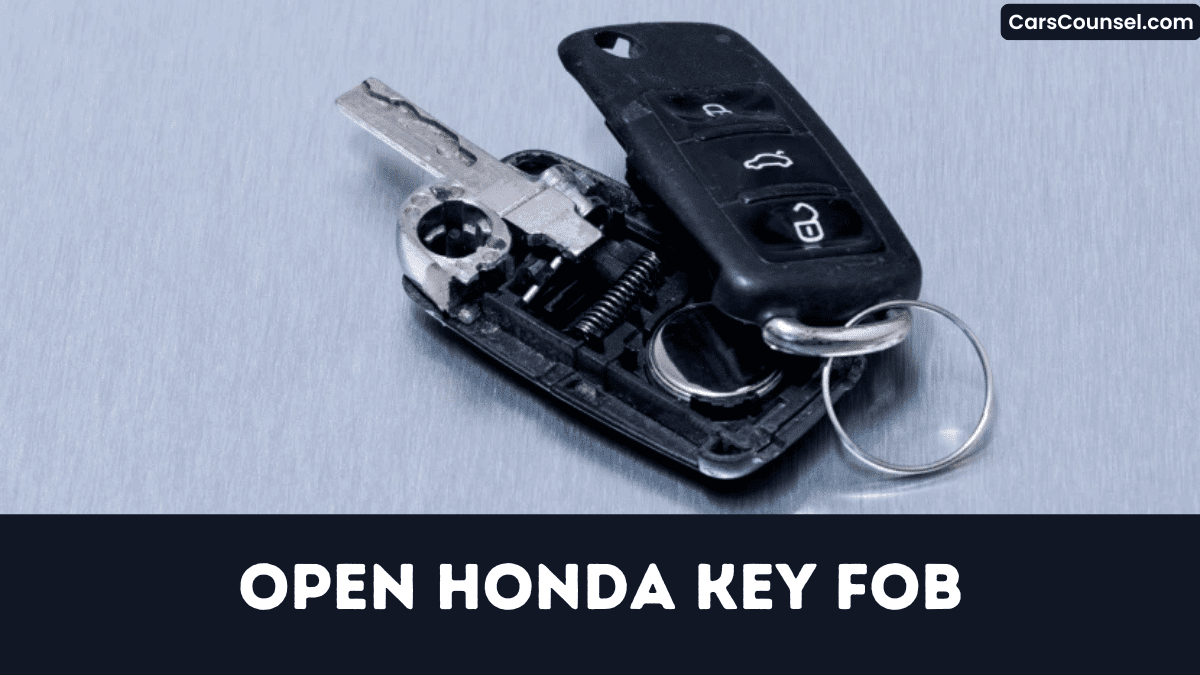
Slide the metal‑key release button outward and pull the physical key out before you try to open the fob.
Then, insert the key’s flat edge into the top slot and apply plastic force.
Use a plastic pry tool, not metal, to avoid scratches.
Apply firm pressure near the seam; the back cover should snap off.
Keep halves aligned carefully to protect the battery and prevent warpage.
- Release key, note key grip for control.
- Insert flat edge, use plastic force at seam smoothly.
- Pry gently with plastic tool, maintain even pressure.
- Remove cover, keep halves aligned to avoid dislodging battery.
Replacing the 3‑V CR2032 Battery in a Honda Key Fob
Because a dead CR2032 disables remote entry, you’ll need to replace the 3‑V lithium cell promptly to avoid being locked out. Pry the fob halves apart with a thin plastic tool, keep the interior clean, and lift the 20 mm battery using your thumbnail without bending contacts. Place the new CR2032 positive side up, then press the halves together until a single snap is heard. Test lock/unlock; a response confirms correct install and preserves battery lifespan. Finally, follow environmental disposal rules for the old cell. Follow these concise steps: Each action minimizes error risk quickly.
| Step | Action | Tip |
|---|---|---|
| 1 | Pry | Care |
| 2 | Lift | NoBend |
| 3 | Snap | Verify |
Programming the Honda Key Fob After a Battery Swap
After you replace the battery, you’ll enter programming mode by inserting the key, turning it to ON, and holding the LOCK button for one second as the doors lock‑unlock.
While the doors cycle, press the LOCK button again for one second; the second lock/unlock confirms the fob has successfully paired with the vehicle.
Finally, turn the ignition OFF and test all remote functions from at least five feet to verify the pairing and eliminate any security gaps.
Enter Programming Mode
How do you put a Honda key fob into programming mode after swapping its battery?
Sit inside, close doors, insert the key and turn it to ON. Hold LOCK for one second, release, turn key OFF; repeat this timing sequence twice more. After the third cycle, keep the key ON, hold LOCK one second, and watch the doors lock‑open automatically, confirming fob sync.
- Turn ignition ON, then OFF, repeating the lock timing.
- After third OFF, keep ignition ON and hold LOCK.
- Doors will lock then open, indicating fob sync successfully.
- Leave ignition ON until cycle ends, then turn OFF.
Verify Successful Pairing
While you finish the programming sequence, watch for the vehicle’s response to confirm the fob is paired.
When the second LOCK press registers, the doors should execute a lock cycle within ten seconds, then release.
Simultaneously, the hazard flash will occur twice, confirming the programming event.
If you see no lock cycle, repeat the ON‑LOCK‑OFF trio up to three times before restarting the procedure.
A successful pair displays ‘Key Fob Programming Complete’ on the instrument cluster for three seconds and grants up to twenty‑foot remote operation.
Verify range by stepping back; if the fob fails, re‑program to avoid hazards.
Troubleshooting a Non‑Responsive Honda Key Fob Battery
Why does your Honda key fob suddenly go silent? The 3‑volt CR2032 battery often ages beyond two years, losing voltage.
Check for signal interference or temperature effects that can mask a weak cell. Replace the circular battery using a screwdriver or fingernail, keeping positive side up.
After insertion, press the lock button two inches of the door handle; if no response, re‑seat the battery and verify alignment. Use a smartphone camera to confirm LED flashes, showing delivery.
Silence suggests circuit damage; seek Honda service inspection.
- Verify battery age
- Re‑seat and align battery
- Test LED with camera
- Consult Honda service
What Mistakes Usually Ruin a Honda Key Fob?
When you swap the battery, inserting a non‑CR2032 cell or reversing the polarity even a few millimeters will short the PCB and burn the contact pads, causing immediate failure.
Using incorrect polarity or a higher‑voltage cell instantly fries the circuit.
Applying excessive force when prying the halves apart cracks the antenna coil, eliminating the key‑less entry signal.
Exposing the fob to moisture without thorough drying creates corrosion on contacts, accounting for many warranty claims.
Skipping the required re‑learn procedure after a battery swap leaves the unit unpaired, rendering it’s inoperable until dealer programming.
Avoid these errors; preserve fob functionality.
Where to Buy a Genuine Honda Key Fob Battery
Where can you obtain a genuine Honda key fob battery?
You can source it from authorized dealership locations, reputable auto‑parts chains, big‑box retailers, or a trusted online marketplace.
- Honda dealership parts desk (e.g., Wolfchase Honda)
- AutoZone or O’Reilly (OEM 3‑V CR2032)
- Walmart/Target electronics aisle (compatible lithium)
- Honda Parts website (official online marketplace)
Verify the 3‑V flat lithium cell before installation; counterfeit units can cause lockout or noise, compromising vehicle security.
Call the parts department ahead to confirm stock, especially at local hardware stores.
Don’t forget receipts for warranty claims.
Never purchase unbranded cells from dubious sellers or forums.
Finding Honda‑Authorized Service Centers for Key Fob Repairs
Some drivers discover that locating an authorized Honda service center is essential for secure key‑fob repairs.
Use Honda’s Find a Dealer tool, enter your ZIP code, and filter results to a 20‑mile radius to assess dealer proximity.
Then call the department—like Wolfchase Honda at (615) 555‑0123—to confirm they’ve stocked battery and can program it.
Ask for the service manager’s Honda technician ID or look for the ‘Honda Certified Service Center’ badge on the dealer’s webpage to verify certification.
Check operating hours, appointment rules, and review service ratings; locations, such as Gates Honda, provide same‑day battery replacement between 8 AM and 5 PM.
Tips for Confirming the New Battery Works Correctly
After you replace the battery, press the lock and release buttons and verify the doors respond within 0.5‑1 second, confirming proper power and signal transmission.
Then walk 5‑10 feet away and test the fob again; if the commands still execute, the signal range remains intact.
If you notice any delay or failure, re‑check polarity, contacts, and battery voltage to prevent losing remote access.
Check Signal Range
When you’ve installed the new 3‑V battery, stand about 5 ft (1.5 m) from the vehicle and press the lock button; a crisp click and immediate door lock confirm basic operation.
Now conduct range testing up to 30 ft, watching for signal attenuation.
- Step back in 5‑ft increments, confirming each lock/unlock command succeeds.
- At 30 ft test the trunk release; it draws more power and reveals weak cells.
- Watch the LED; a bright flash at full distance proves adequate power, a dim flash signals low output.
- Compare this range to the original fob; a loss over 5 ft suggests an incompatible or defective battery.
Test Lock/Unlock Function
Run through the lock and release sequence to confirm the new battery is delivering power. If you hear the click and see the LED flash, the fob powers correctly. Verify doors lock and open within two seconds, and confirm trunk release and interior lights react from five‑foot distance. Any missed response means you must re‑check thoroughly polarity, clean contacts, and reseat the battery before retesting again.
| Action | Result |
|---|---|
| Press lock button | Audible click, doors lock in 1–2 s |
| Observe LED | LED indicator flashes briefly |
| Test from 5 ft | Remote operates, trunk and lights respond |
| Failure | Re‑inspect polarity, clean contacts, reseat battery |
How to Open Key Fobs by Brand: Hidden Key Release, Battery Type & Case Separation
| Toyota Key Fob | Hyundai Key Fob | |
| Chevy Key Fob | Ford Key Fob | Jeep Key Fob |
| Subaru Key Fob | Kia Key Fob | Mercedes Key Fob |
| Audi Key Fob | Volvo Key Fob | VW Key Fob |
Frequently Asked Questions
How Do I Open the Key Fob on a Honda?
You’ll open the Honda key fob by selecting a flat‑head screwdriver for tool selection, inserting the extracted key into the top slot, applying a twist, and carefully performing fob disassembly while avoiding internal clip damage.
How Do I Open up a Honda Pilot Key Fob?
Break the ice by sliding the metal release, using fob tools, then pry the pilot design halves apart, exposing the battery while keeping the internal clip secure. You’ve got to avoid forcing it, preventing damage.
How Do I Change the Battery in a Key Fob?
You’ll replace the CR2032 battery type by prying the fob halves, swapping the cell, and snapping it shut; expect a replacement cost under $10, and avoid short‑circuit threats by handling polarity carefully during the process.
How Do I Open My 2020 Honda Key Fob?
You’re opening your 2020 Honda key fob by sliding the metal release, inserting the extracted key, twisting to pop the back; verify carefully security considerations, avoid damaging contacts, and note warranty impact before proceeding properly.
Conclusion
You’ve just mastered opening your Honda key fob without scratching the housing. Keep the plastic spudger handy and never substitute metal tools, or you’ll risk short‑circuiting the CR2032. After swapping the battery, test the remote before slipping it back together—just like a knight checking his sword before battle. Remember, a misaligned seam can expose the PCB to moisture, rendering the fob useless. Stay precise, stay safe, and your key will stay reliable for years ahead.

