Is it true that you can split a Jeep key fob without damaging its waterproof seal? You’ll find that a careful twist with a #2 flat‑head screwdriver, followed by a gentle pry using a plastic tool lets you separate the halves cleanly.
Mastering this method saves you from buying a new remote and keeps the internal contacts intact, so keep going to learn the exact steps.
Quick Navigation
Key Takeaways
- Insert a #2 flat‑head screwdriver into the seam beside the key‑ring mount and twist gently to separate the fob halves.
- Use a small plastic pry tool to split the halves evenly, avoiding metal scratches and preserving the water‑resistant seal.
- Observe the CR2032 battery orientation; the negative side should face down toward the PCB before removal.
- Lift the old battery with a non‑metallic tool and insert a fresh CR2032, negative side down, ensuring it sits flush.
- Press the fob halves together until a distinct click is heard, then test lock/unlock range to confirm proper reassembly.
Open the Jeep Key Fob Without Breaking It
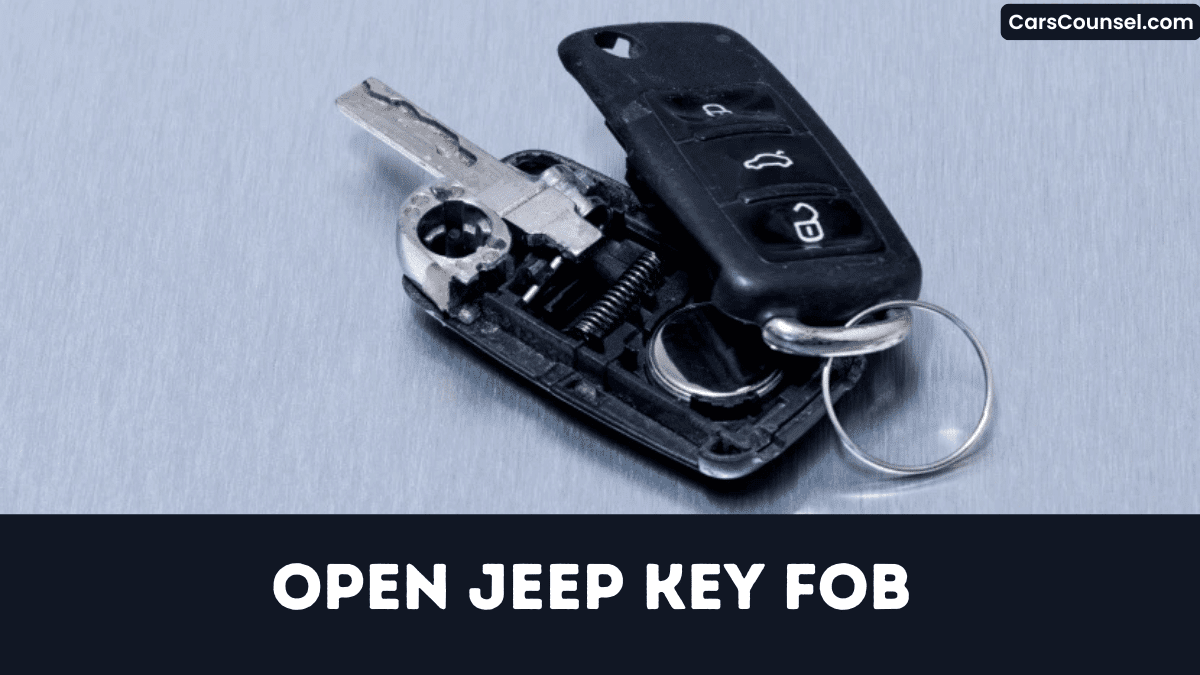
Pop open the Jeep key fob by slipping a flat‑head screwdriver into the seam beside the keyring mount and gently twisting until the halves separate without cracking the plastic.
Next, grab a small plastic pry tool if you’ve one; its non‑metal tip guarantees scratch prevention while evenly spreading stress distribution across the housing.
After the shell opens, observe the CR2032’s orientation—negative side faces down—then lift it out. Insert the fresh battery with the negative side down, pressing until it sits flush against the contacts.
Finally, snap the halves together firmly, carefully aligning the seam to preserve the water‑resistant seal.
Why You Need a Jeep Key Fob Battery Replacement
Once you’ve opened the Jeep key fob, you’ll see that the CR2032 battery is the heart of its wireless performance.
A weakening battery cuts signal range, dropping below 50 ft, so remote lock/open becomes unreliable.
A weakening battery shrinks signal range below 50 ft, making remote lock/open unreliable.
Voltage drop also delays keyless entry and triggers panic‑button or trunk‑release failures.
Jeep fobs last three to four years; any sign of reduced performance signals deteriorating battery health.
Multiple attempts to lock or open usually stem from insufficient power output as the cell depletes.
Replacing the CR2032 restores full functionality, guarantees peak signal range, and eliminates the risk of being stranded when the fob dies.
Gather the Essential Tools for the Job
Two items you’ll reach for first are a #2 flat‑head screwdriver and a small plastic pry tool, which let you separate the fob halves without scratching the keypad.
Add a soft cloth to protect the keypad while you realign the halves, and place the fob on a clean, static‑free work surface to avoid electrostatic discharge damaging the circuit board.
Include a fresh CR2032 lithium battery in your tool checklist, confirming the negative side faces down before insertion.
Your screwdriver selection matters; a #2 tip offers ideal torque without stripping the tiny slots.
Store tools neatly; you’ll need them later.
Locate the Seam and Separate the Halves Safely
While the seam runs along the edge opposite the keyring mount, you’ll locate it by feeling for the faint line that traces the full length of the housing.
Assess seam visibility before you begin; a workspace improves detection.
For tool selection, grab a flat‑head screwdriver and angle it 30‑45° into the seam, applying gentle upward pressure until a gap appears.
Insert a thin plastic spudger, keeping it parallel to the surface, and slide it slowly around the circumference, releasing tension every few centimeters to prevent snapping.
After halves separate, confirm circuit board sits level and all clips remain intact.
Remove the Old CR2032 Battery and Note Polarity
Because the fob’s interior is delicate, you’ll gently pry the seam apart with a flat‑head screwdriver to expose the circuit board where the CR2032 battery sits.
First, verify the polarity marking: the negative side (–) should face down toward the PCB.
Place a fingertip on the flat side to confirm orientation, then record the layout if needed.
Using a non‑metallic tool, lift the depleted battery away, avoiding contact with the contacts.
Dispose of the old cell responsibly; follow local hazardous‑waste guidelines for battery disposal.
Keep the two halves aligned for the upcoming replacement and guarantee proper function before testing.
Install the New CR2032 Battery for Jeep Key Fob Replacement
First, grab a flat‑head screwdriver and gently pry the seam near the key‑ring mount until the two halves of the Jeep fob separate.
Use a flat‑head screwdriver to gently pry the seam near the key‑ring mount, separating the fob halves.
Pull out the depleted CR2032, noting the “–” side faces down.
Choose a brand selection for replacement cell to guarantee voltage stability.
Place the new battery with its negative side down, aligning the metal contact to the spring tab.
Verify the battery sits flush, then you’re ready to close the fob housing without forcing it.
Perform eco disposal of the old cell at a recycling center.
Test lock/unlock range; if needed, re‑program using the OFF procedure.
Snap the Fob Halves Back Together Securely
After you’ve installed the new CR2032, align the mating edges of the two halves so the internal clips line up, then press firmly until you hear a distinct click.
Confirm the circuit board lies flat; any tilt will break clip alignment and cause intermittent response.
Insert the keyring mount fully before sealing, then apply even pressure around the perimeter for two to three seconds, forcing gasket compression and restoring the original IP‑67 rating.
Hold the halves together until the latch locks solidly, then release.
This method guarantees a watertight seal and reliable latch operation.
Your fob stays fully functional.
Test All Remote Functions to Confirm Success
First, you’ll verify lock and release by pressing each button three times from 30 ft and confirming the doors actuate on the first press without delay.
Then, you’ll activate the trunk release and make sure the latch opens within two seconds, proving the dedicated transmitter works.
Finally, you’ll hold the panic button for at least one second, step back to 45 ft, and check that the alarm sounds and the hazard lights flash, confirming the emergency signal’s range.
Verify Lock/Unlock Operation
How do you know your Jeep key fob’s fully operational right now? Stand ten to fifteen feet from the vehicle, press lock, and watch all doors click while interior lights flash within one second. Then press release; each door should unlatch and the hazard indicator flash, confirming strong signal strength and minimal response latency. If any action exceeds two seconds, repeat the programming cycle and retest.
| Function | Expected | Result |
|---|---|---|
| Lock | click flash ≤1s | Pass |
| Release | doors open hazard flash ≤1s | Pass |
| Panic | horn 5s continuous |
Check Trunk Release Response
Why does the trunk release matter in a remote test? Because it validates both response timing and signal strength under real‑world conditions.
- Press the trunk button from 5 ft; latch must disengage within 1 second.
- Repeat the test at 50 ft; release must occur, confirming full battery voltage.
- Verify a 0.5‑second delay when opening the rear hatch while the vehicle is locked.
- Observe consistent response timing across all attempts to confirm strong signal strength.
If any step exceeds the specified window, replace the battery or re‑pair the fob, then retest until every measurement meets the manufacturer’s criteria. Consistent performance guarantees reliable trunk access on every drive.
Assess Panic Button Range
When you position yourself 30 ft (≈9 m) from the Jeep and press the panic button, you’ll hear the alarm and see the lights flash within 2 seconds; repeat the test at 10 ft, 20 ft, and 40 ft, holding the fob both button‑side up and down, to confirm consistent range and antenna performance.
First, check battery health with a multimeter; below 2.8 V typically cuts range over 25 %.
Then, perform the steps in an open field free of metal structures or electronic devices, because signal interference can halve effective distance.
Record each activation time; any delay indicates antenna or battery issues.
Confirm reliability before use.
How to Open Key Fobs by Brand: Hidden Key Release, Battery Type & Case Separation
| Toyota Key Fob | Honda Key Fob | Hyundai Key Fob |
| Chevy Key Fob | Ford Key Fob | |
| Subaru Key Fob | Kia Key Fob | Mercedes Key Fob |
| Audi Key Fob | Volvo Key Fob | VW Key Fob |
Frequently Asked Questions
How Do I Pop Open a Jeep Key Fob?
You’re popping the Jeep fob by exploiting its fob ergonomics: locate the seam, insert a flat‑head screwdriver, gently twist carefully to engage the release mechanisms, lift the edge, and the halves pop apart without damage.
How to Change the Battery in a Jeep Key Fob?
Think of you’re fob as a tiny lighthouse, its lamp dimming; replace the CR2032 battery type, negative side down, snap it shut, then perform the reset procedure by turning the key ON briefly five seconds.
How Do I Pop a Key Fob Open?
You’ll pop the key fob open by locating the hidden latch, inserting a plastic pry tool, and gently levering the halves apart; work slowly to avoid cracking the shell, then easily access the interior components.
How to Open Jeep Key Fob to Change Battery 2020?
Break the ice by sliding a flat‑head screwdriver into the seam, gently prying the 2020 Jeep fob halves apart—watch for model variations, but the process won’t affect warranty impact; you’ll replace the CR2032, snap closed.
Conclusion
Now that you’ve cracked open the fob and swapped the CR2032, you’re ready to restore full remote command. Keep the gasket aligned and the polarity correct—any slip will short‑circuit your signal. When you snap the halves together, feel the click like a lock engaging; that’s the seal confirming water‑resistance. Test lock, release, and panic‑button functions; if every beep sounds clean, you’ve mastered the repair without a single crack and your Jeep will thank you forever.

