It’s funny how the same day you notice the fob’s light flicker, the battery’s already dead.
You’ll release the hidden emergency key, pry the halves apart, and lift the tiny green board without bending contacts, because a slip could ruin the transmitter.
Note the CR2032 orientation before swapping, then snap the case back firmly to prevent future failures. Curious about the precise tools and sequence?
Quick Navigation
Key Takeaways
- Pull the hidden emergency key from the fob top to expose the seam for opening.
- Insert a thin flat‑head screwdriver into the side slot and gently pry the two halves apart.
- Lift the green circuit board straight up, avoiding any twisting that could damage contacts.
- Remove the CR2032 battery, noting the positive side faces up, then replace with a matching new cell.
- Snap the halves back together, ensure the latch clicks, and test lock/unlock functions from a short distance.
Release the Toyota Emergency Key for Battery Replacement
Press the metal emergency‑key release button on the fob’s top, then pull the hidden key out; this action disengages the internal latch and grants access to the battery compartment.
Press the metal emergency‑key button, pull the hidden key, and the latch releases for battery access.
You’ll perform the latch release by inserting the extracted blade into the side slot on newer models; on older units, you must gently pry the key with a flat‑head screwdriver.
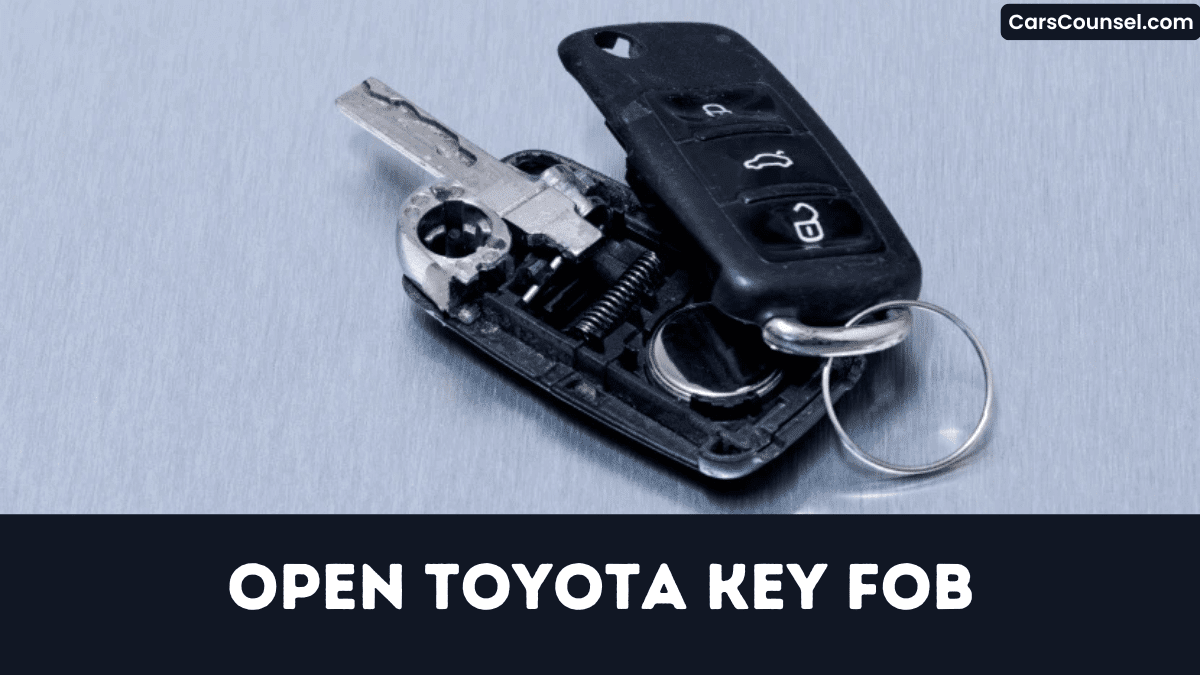
Key extraction reveals the green circuit board, exposing the battery.
Avoid forcing components, any excess pressure can crack the housing or damage contacts.
After swapping the cell, re‑insert the emergency key fully until the button clicks, confirming proper reassembly and safe operation.
Open the Toyota Key Fob Without Cracking It
How can you open the Toyota key fob without cracking it?
Press the metal emergency‑key button on top, pull the key out, and expose the seam.
Choose a thin flat‑head screwdriver or the hidden key blade; careful tool selection prevents damage.
Insert the tip into the slot and gently pry the halves apart, allowing plastic flex but never forcing.
Once opened, lift the green circuit board straight upward—no twisting—to avoid cracking the plastic.
Keep the board oriented; the battery compartment becomes visible for safe access.
After service, snap the board and case together, confirming full alignment before properly resealing.
Remove the Battery and Verify Its Placement
Where does the battery sit? You pry the fob apart with a flat‑head screwdriver, lift the green circuit board, and expose the CR2032 compartment.
Before removal, you perform a polarity check, noting the positive (+) side faces up.
Gently lift the cell, avoiding contact‑strip damage, and set it aside.
Insert the replacement CR2032, matching the original battery orientation precisely.
Snap the board back, confirming full contact alignment.
Close the halves, ensuring the latch engages securely.
Finally, test the fob within 50 ft; if the lock/unlock button fails, re‑inspect polarity and seating before proceeding and verify full functional range before use.
Identify and Source the Correct Toyota Key Fob Battery
Why settle for a generic cell when a specific CR2032 guarantees reliable key‑fob performance?
You must match the 20 mm diameter, 3.2 mm thickness, and 3 V rating stamped on the original battery.
Match the 20 mm diameter, 3.2 mm thickness, and 3 V rating of the original battery.
Verify polarity by noting the “+” side before removal and install the new cell with the positive side up.
Conduct brand selection by choosing ISO 9001‑certified manufacturers; reputable options include Panasonic, Energizer, and Duracell.
Perform price comparison across AutoZone, Walmart, and Amazon, where packs of five to ten cost $2‑$5 each.
Confirm packaging reads “Lithium 3 V Coin Cell CR2032” before purchase.
Correct cell prevents signal loss and avoids costly re‑programming.
Snap the Case Back Together and Test All Remote Functions
First, you’ll align the green circuit board’s four clips with the case’s matching slots, then press the two halves together until you hear a firm snap that confirms a secure seal.
Next, check seal integrity by lightly tugging edges; any gap means mis‑alignment.
Verify battery polarity stays positive‑up; reversed cells kill all signals.
Perform function verification: from 50 ft, press lock and release; doors must react within 0.5 seconds.
Trigger trunk release and panic button; trunk opens and alarm flashes within one second.
If any test fails, reopen, reseat board, clear debris, re‑snap, and retest.
Precise assembly avoids intermittent remote loss.
How to Open Key Fobs by Brand: Hidden Key Release, Battery Type & Case Separation
| Honda Key Fob | Hyundai Key Fob | |
| Chevy Key Fob | Ford Key Fob | Jeep Key Fob |
| Subaru Key Fob | Kia Key Fob | Mercedes Key Fob |
| Audi Key Fob | Volvo Key Fob | VW Key Fob |
Frequently Asked Questions
How Do I Open My Toyota Key Fob?
You’re opening the fob by pressing the metal key button, pulling the key, inserting a screwdriver, and prying the halves apart; then perform battery replacement, reassemble carefully, and verify remote syncing before driving properly safely.
How Do I Pop Open a Key Fob?
Carefully crack, pry, and pop the fob using a flat‑head screwdriver; you’ll expose the battery compartment for battery replacement, then reassemble to preserve signal range, avoiding board damage or latch loss while ensuring proper alignment.
How to Take off a Toyota Key Fob Cover?
To take off the Toyota key fob cover, you’re using a flat‑head screwdriver as removal tools, gently pry the plastic cover material at the seam, avoiding excessive force that could crack the housing or damage.
How Do I Open My Key Fob Cover?
Think of the fob as a locked chest; you’ll press the metal release, insert a screwdriver, twist gently, and split the halves, exposing the battery for replacement and allowing remote programming, avoiding damage completely safely.
Conclusion
You’ve just reassembled the fob, but the real test lies ahead. If the halves aren’t snapped tightly, stray contacts could short the circuit, leaving you stranded. Double‑check the battery polarity; a reversed cell can fry the board in seconds. Once you press the lock button, listen for the click—any silence signals a mis‑alignment. Only then can you trust the remote, knowing you’ve avoided costly repairs and lost access. Proceed carefully, and your key works flawlessly.

