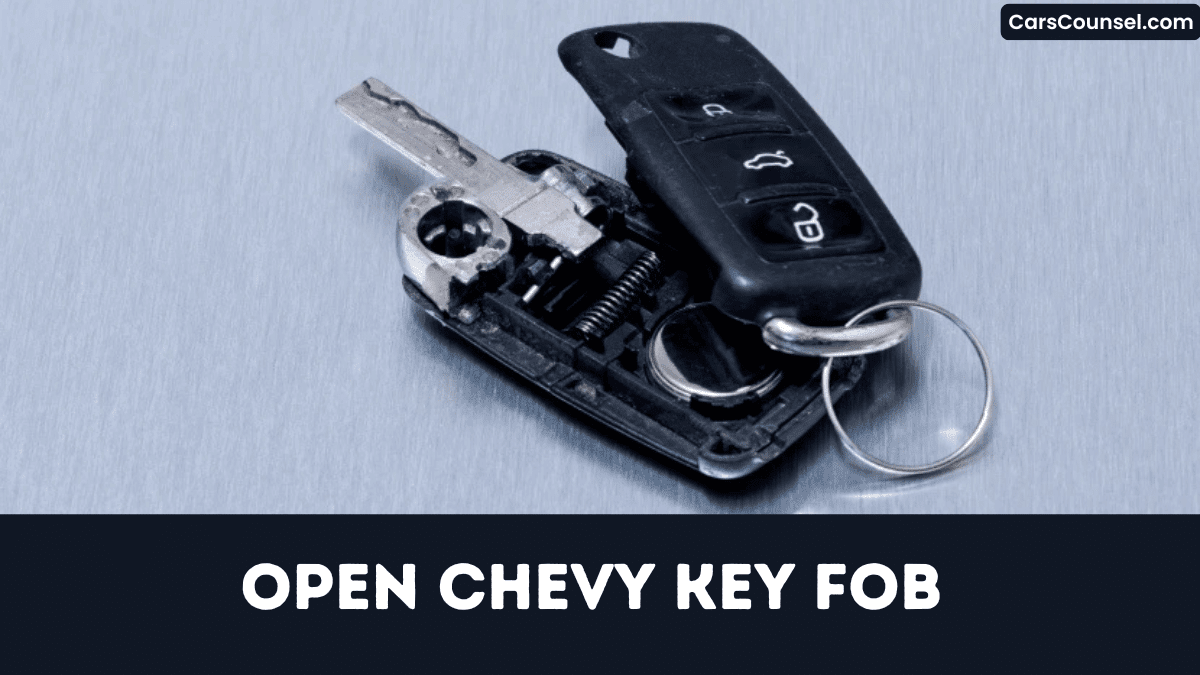
You might think opening a Chevy key fob is a mission impossible, but the process is straightforward if you follow the right steps.
By identifying your fob model, gathering a 2 mm flat‑head screwdriver and a nylon pry tool, you’ve got everything needed to safely separate the halves, reveal the battery, and replace it without cracking the housing.
The next tip will prevent common mishaps.
Quick Navigation
Key Takeaways
- Use a 2‑mm flat‑head screwdriver or thin plastic pry tool to gently separate the fob seam at the gap.
- Locate the release button for the emergency metal key, press it, and slide the key out before opening the case.
- After prying, identify the battery compartment; note the “+” marking for correct polarity before removing the old battery.
- Clean the battery contacts with an isopropyl‑alcohol‑dipped cotton swab, then dry before inserting the new CR2032 or CR2450 battery.
- Snap the housing halves together, ensuring clips engage fully, then test all buttons and the LED to confirm proper reassembly.
Identify Your Chevy Key Fob Model
How can you pinpoint which Chevy key fob you’ve got?
Examine the front: a sealed chrome button indicates a smart‑key, introduced 2017 onward; a metal blade that flips out signals a flip‑key used 2010‑2016; a solid rectangular shape with four buttons denotes a standard remote on pre‑2010 models.
Check the front: chrome button = smart‑key (2017+); flip‑blade = flip‑key (2010‑16); four‑button rectangle = pre‑2010 remote.
Open the battery compartment; CR2032 marks pre‑2020 fob generations, CR2450 marks 2020‑and‑newer smart‑keys.
Flip the fob and read the stamped model codes on the back—e.g., “A‑G‑001” for a 2015 Equinox flip‑key.
Cross‑reference those codes with Chevrolet’s parts catalog to verify the exact model.
Record the code before ordering replacements or programming.
Gather the Tools for Your Chevy Key Fob
You’ll need a 2 mm flat‑head screwdriver or the metal emergency key to pry the fob open, and a plastic pry tool or a ¼‑inch coin to avoid scratching the housing.
Have the correct replacement battery ready—CR2032 for pre‑2020 models or CR2450 for 2020‑and‑newer units.
Place the fob on a soft cloth while you work to protect its finish.
Small Flat‑Head Screwdriver
Why settle for the wrong tool when a 2 mm–2.5 mm flat‑head screwdriver (≈ #0‑#1) fits the job?
You’ll want a screwdriver whose tip material is hardened steel and whose shaft is non‑magnetic, so you won’t interfere with the fob’s electronics.
The tip must fit the 1.5 mm side slot tightly, giving you torque without slipping.
Handle ergonomics let you apply 1–2 N force; push until the halves pop apart.
Avoid exceeding 5 N, which can crack the housing or strip clips.
On flip‑key models, insert the blade into release notch beside the key to free the emergency latch.
Choose a tool that fits pocket.
Plastic Pry Tool
When you need to open a Chevy key fob, a thin ≈ 2 mm nylon or ABS pry tool does the job.
Choose a tool length of 50‑70 mm to reach the seam slot without slipping.
The plastic material selection reduces scratching risk compared with metal screwdrivers and guarantees adequate tool durability for repeated openings.
Purchase one for $1‑$3 at auto parts stores, hardware shops, or online.
Insert the tapered edge into the seam, apply pressure, and slide around the perimeter to free the internal clips.
Remove the tool before reassembly so the snap‑fit clips engage fully and preserve water‑resistance.
Correct Battery Size
Because most Chevrolet key fobs built before 2020 use a CR2032 3 V lithium cell, while models from 2020 onward require the larger CR2450 3 V cell, you must verify the battery size before opening the fob.
Check the printed diagram inside the fob for battery compatibility; it will list either CR2032 (20 mm × 3.2 mm) or CR2450 (24.5 mm × 5.0 mm).
Perform size verification before removal, because the cells aren’t interchangeable.
Use a flat‑head screwdriver or plastic pry tool to split the halves, then replace the old battery with a new CR2032 or CR2450, ensuring the positive (+) side aligns with the polarity marking.
Cost stays under five.
Remove the Emergency Metal Key From the Fob
You locate the small release button on the side of the fob, often marked with a key icon, and press it to free the emergency metal key.
Then you slide the key forward until it clicks out of the spring‑loaded housing, making sure the thin metal pin is fully depressed.
Finally, store the extracted key in a safe place, as it provides manual entry when the fob battery fails.
Locate Release Button
To free the metal key, locate the release mechanism that matches your fob’s model year. On 2010‑2016 flip‑keys, the button placement is a recessed tab on the right side below the lock/unlock buttons; a fingernail gives a tactile hint. Pre‑2010 remotes hide a circular push‑button centered on the underside, marked by a key silhouette. From 2020 onward, a smart‑key uses a metal latch on the back; insert a blade into the notch beside the Chevrolet logo and feel the latch release.
| Model Range | Release Type |
|---|---|
| 2010‑2016 | Recessed side tab |
| Pre‑2010 | Center underside push‑button |
| 2020+ | Back‑latch notch |
Slide Key Out
After locating the release button, press it firmly while holding the fob upright.
Keep the button depressed and slide the emergency metal key upward until you achieve groove clearance.
Verify key alignment before fully extracting the key to avoid damaging the latch.
- Hold the fob steady, press the release, and pull the key straight out.
- If the key sticks, insert a thin coin into the slot and pry gently for additional groove clearance.
- Store the key safely; when reinserting, align the clip precisely for correct key alignment.
The process guarantees fob operation and prevents internal damage.
Gently Pry the Chevy Fob Open Without Cracking It
How can you open a Chevy key fob without cracking the plastic?
Insert a thin plastic pry tool or a small flat‑head screwdriver into the 0.5 mm seam, then apply finger pressure with gentle torque control.
Work slowly around the perimeter, lifting a few millimetres at a time to release internal clips without snapping the housing.
For flip‑key models, press the release button first, expose the metal key, and pry the halves apart at the hinge side where the latch is weakest.
Avoid excessive force or metal tools on the glossy chrome button area to prevent deformation and contact damage.
Locate the Battery and Verify Polarity
When you pry the fob open, you’ll see a shallow compartment centered under a small plastic cover, usually marked with a “+” sign that indicates the positive side.
Inside, the flat battery rests against a metal spring.
Determine the correct type—CR2032 for pre‑2020 models, CR2450 for 2020‑onward—by checking slot width.
Check slot width: use CR2032 for pre‑2020, CR2450 for models from 2020 onward.
Verify battery orientation by aligning the “+” marking on the tray with the battery’s positive face.
Perform a quick polarity check: press the button; the LED should flash.
- Confirm exact model battery size.
- Accurately match “+” on tray to battery.
- Test proper response for polarity check.
Replace the Battery (CR2032 or CR2450) Correctly
Because the battery type varies by model year, you’ve got to first confirm whether your fob requires a CR2032 (pre‑2020) or a CR2450 (2020‑onward) by checking the imprint on the old cell or the diagram inside the case.
Use a flat‑head screwdriver or plastic pry tool to separate the halves gently, avoiding excess force that could break clips.
Extract the old cell with a tool, note polarity, and insert the new battery with the “+” side up.
Press until flush, snap the halves together, ensuring all clips engage.
Observe Battery lifespan guidelines and arrange Eco disposal for spent cell.
Reassemble the Chevy Key Fob and Test Its Functions
Why not begin by aligning the two fob halves evenly, then applying pressure around seam alignment until the internal clips snap audibly, confirming a sealed enclosure?
Next, you confirm the battery sits with the positive side oriented as shown, then close the case.
You perform LED verification by pressing each button once; the LED should flash, confirming circuit integrity.
- Verify battery polarity, confirming positive side faces up per diagram.
- Press lock, release, trunk, and panic; observe LED verification flash for each.
- Test RF range at 10 ft and 30 ft; for smart‑key models, hold lock + release 15 seconds to reset proximity.
Troubleshoot Common Issues After Battery Replacement
If the fob doesn’t respond after you replace the battery, first confirm that the positive side is oriented correctly.
Verify polarity; a reversed cell blocks transmission.
Press and hold lock and release buttons for about 15 seconds to re‑initialize fob’s coding with vehicle receiver.
Clean contacts with a cotton swab and isopropyl alcohol to remove corrosion that causes intermittent responses.
Make sure the battery matches the model—CR2032 pre‑2020, CR2450 2020‑onward—since an undersized cell reduces voltage and can cause button latency.
Test range five feet away; if signal works only up close, reseat the case tightly to eliminate clear signal interference.
How to Open Key Fobs by Brand: Hidden Key Release, Battery Type & Case Separation
| Toyota Key Fob | Honda Key Fob | Hyundai Key Fob |
| Ford Key Fob | Jeep Key Fob | |
| Subaru Key Fob | Kia Key Fob | Mercedes Key Fob |
| Audi Key Fob | Volvo Key Fob | VW Key Fob |
Frequently Asked Questions
How Do I Open a Chevy Key Fob?
You’re inserting a flat‑head screwdriver into the side slot, twist gently to release the clips, lift the housing carefully, then access the battery for replacement and perform remote programming after reassembly, once properly, finally again.
How to Take a Key Fob Apart?
Like opening a tiny puzzle box, you’ll pry the seam properly with a plastic tool, Tool selection, separate the halves, note battery orientation, perform Battery replacement, then snap it back together quickly, carefully, ensuring functionality.
How to Take Apart a 2018 Chevy Key Fob?
You’ll pry the fob’s seam with a flat‑head screwdriver, separate the halves, lift the CR2032 battery, note its position for battery lifespan monitoring, replace it, re‑click, then perform signal testing and verify remote functions properly.
How to Open a 2020 Chevy Silverado Key?
You open the 2020 Silverado key by inserting a flat‑head screwdriver into the side seam, twisting to release the halves, then perform battery replacement; after reassembly, run remote programming to confirm operation and verify function.
Conclusion
Now you’ve successfully split, swapped, and sealed your Chevy key fob, ensuring seamless signal and sturdy structure. By following each step—selecting suitable tools, safely extracting the metal key, gently prying, precisely placing the correct polarity battery, and reassembling with care—you’ve minimized mishaps and maximized performance. Should any glitches persist, revisit the contacts, verify alignment, and confirm the battery’s charge. Keep this concise guide handy for future fixes and flawless functionality for reliable, rapid, repeated use.

