The sleek exterior of your Mercedes key fob hides a delicate, battery‑powered circuit.
If you’ve ever wondered how to access it without cracking the polycarbonate shell, you’ll need the right tools and a methodical approach.
Follow these steps to open the housing safely, replace the CR2032, and keep the fob functioning flawlessly.
Quick Navigation
Key Takeaways
- Use a thin‑profile precision screwdriver to remove the tiny screw on the fob’s seam, preventing strip‑off.
- Insert a non‑conductive plastic spudger or lever into the seam, applying even pressure to release the latch clips.
- Gently pry the two halves apart, keeping the top half aligned to avoid cracking the polycarbonate housing.
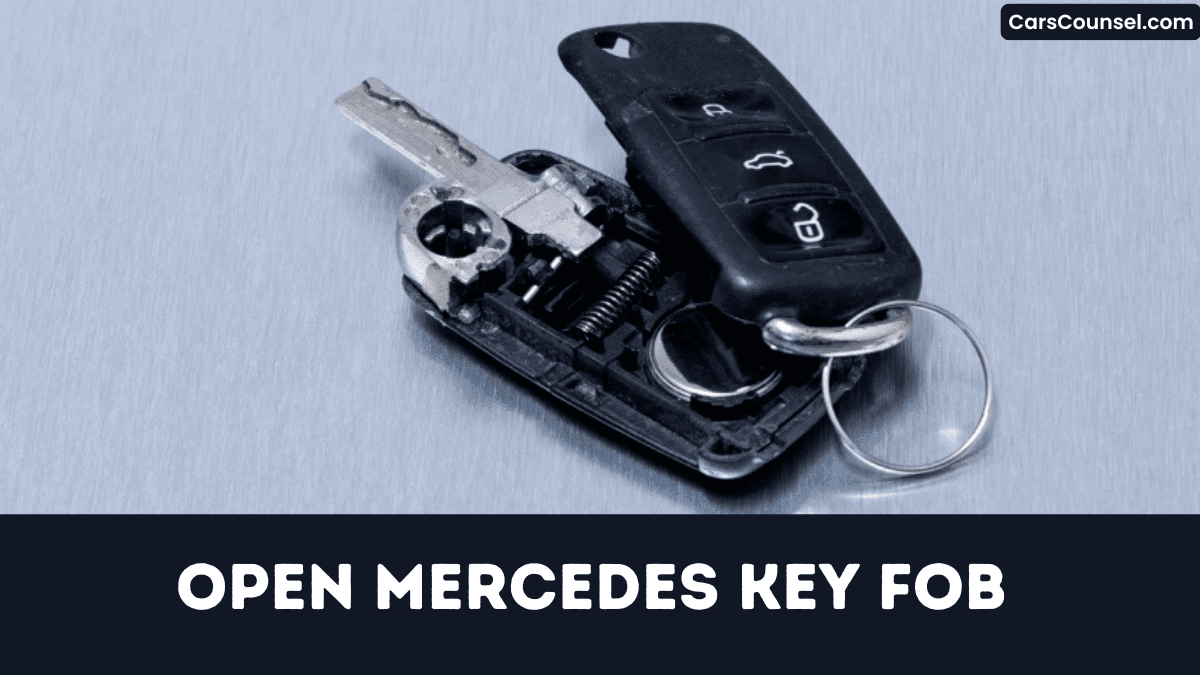
- Locate the shallow side recess, lift the cover with a plastic tool, and extract the CR2032 battery using tweezers.
- After battery replacement, snap the halves together until a firm click confirms a secure, flush seal.
What Tools You’ll Need for a Mercedes Key Fob
Because the key fob’s housing is tightly sealed, you’ll need a precise set of tools to open it without damage.
The key fob’s sealed housing demands precise tools for a damage‑free opening.
First, select a thin‑profile precision screwdriver sized to the fob’s screw heads; this prevents stripping and maintains alignment.
Next, employ a non‑conductive plastic spudger to separate the two halves, applying even pressure along the seam to avoid cracking the polycarbonate shell.
You should also have a pair of tweezers for battery handling and a lint‑free cloth for surface cleaning.
Organize each instrument on a static‑free mat, then proceed methodically, confirming each step before advancing your repair workflow efficiently today.
How to Pry the Mercedes Key Fob Housing Safely
How can you pry the Mercedes key fob housing without cracking it? You position a plastic lever at the seam, then insert a gentle wedge to separate the halves.
Apply steady pressure, rotating the lever a few degrees each time. Avoid forceful prying; let the wedge do the work while you monitor the gap.
When the clips release, lift the top shell carefully.
| Step | Tool | Action |
|---|---|---|
| 1 | Plastic lever | Slip into seam |
| 2 | Gentle wedge | Pry gently |
| 3 | Thumb | Hold bottom |
| 4 | Light pressure | Separate halves |
Now the interior is exposed, ready for inspection and subsequent repair steps today.
Find and Remove the Mercedes Key Fob Battery
You’ll first identify the battery compartment by inspecting the seam where the two halves of the fob meet, often marked by a small slot or notch.
Then you pry open the compartment with a non‑metal tool, lift the old CR2032 cell, and note its orientation.
Finally, you insert the new battery with the correct polarity and snap the housing shut, ensuring a secure fit before testing the fob.
Locate Battery Compartment
While the key fob looks seamless, you’ll find the battery compartment by locating the narrow seam along the side and gently prying the two halves apart with a flat‑head tool or a dedicated key‑fob splitter.
Perform a visual inspection of the interior once opened; the compartment appears as a shallow recess housing a single coin‑cell.
Align the fob with the reference diagram supplied by the manufacturer to confirm orientation before proceeding.
Apply even pressure when separating the halves to avoid cracking the plastic.
Keep the released latch accessible, as it will guide reassembly after battery removal for future reference.
Replace Battery Properly
Where does the battery sit inside the Mercedes key fob? It rests in a recessed compartment behind the plastic shell, aligned with the contacts.
First, you’ll pry the cover open with a flat tool, avoiding metal stress.
Next, you’ll note the CR2032 orientation, then lift the old cell.
Perform voltage verification before discarding, ensuring the replacement reads 3 V.
Finally, insert the new battery, snap the cover closed, and test the fob functions.
Then confirm fob syncs with vehicle.
- Pry shell open.
- Note polarity.
- Verify voltage.
- Battery disposal.
Confirm You Have the Correct Replacement Battery
If you’ve identified the key fob’s battery type, double‑check the part number, voltage, and dimensions before purchasing a replacement. Perform model verification against your vehicle’s VIN to guarantee compatibility, and conduct a voltage check to confirm the new cell meets the 3 V specification. Cross‑reference the manufacturer’s datasheet with the listed dimensions (length, width, thickness) to avoid mechanical mismatch.
| Part Number | Voltage | Dimensions (mm) |
|---|---|---|
| CR2032 | 3 V | 20 × 12 × 2.5 |
| CR2025 | 3 V | 20 × 12 × 2.0 |
| DL2032 | 3 V | 20 × 12 × 2.5 |
| DL2025 | 3 V | 20 × 12 × 2.0 |
Only after you’ve verified part number alignment, confirmed voltage consistency, and measured physical fit should you proceed to acquire the replacement today safely now.
How to Install the New Mercedes Key Fob Battery
You’ll start by prying open the key fob with the slot tool, then locate the battery compartment and note the old cell’s orientation.
Next, you remove the depleted battery, taking care not to short any contacts.
Finally, you insert the new battery with the correct polarity and snap the fob back together.
Open Key Fob
How do you open the Mercedes key fob to replace its battery?
Locate the seam, insert a flat plastic pry tool, and gently twist until the halves separate. Avoid stressing the circuit board. After opening, check contacts for wear that could impact key programming or remote pairing. Keep the shells aligned for reassembly.
- Insert the tool at the lower notch and apply steady pressure.
- Rotate the tool clockwise a few degrees to release the internal latch.
- Separate the halves, exposing the battery compartment without bending any pins.
- Snap the halves together, confirming a tight seal before testing remote pairing.
Locate Battery Compartment
After the fob halves separate, the battery compartment sits centrally beneath the circuit board, exposing a flat, disc‑shaped slot. You’ll first note the visual cues: a recessed rim, a metallic latch, and a printed label that differ across model variations for each type. Align your fingers with the slot’s edge, then gently lift the cover carefully using the latch. Observe the orientation of the contacts; the positive side faces upward. This systematic scan guarantees you locate the compartment without damaging components and preserve integrity.
| Feature | Indicator | Notes |
|---|---|---|
| Rim | recessed | common |
| Latch | metal | varies |
| Label | printed | model |
| Slot | disc‑shaped | central |
Insert New Battery
Where exactly does the new CR2032 battery belong within the fob?
You position it flat against the metal cradle, positive side up, matching the printed diagram.
This orientation maximizes battery lifespan and guarantees reliable signal transmission.
After seating the cell, you’ve closed the fob, snap the halves together, and test each button.
Make sure the interior contacts are free of corrosion, as debris shortens battery lifespan dramatically.
- Align positive (+) side upward
- Press until you hear a click
- Confirm all contacts are clean
- Retain old cell for eco disposal
Follow these steps, and your key fob will operate efficiently.
Reassemble the Mercedes Key Fob Without Cracks
Because the housing of a Mercedes key fob is precision‑molded, you must align the two halves exactly before snapping them together to avoid visible cracks.
Precision‑molded Mercedes key fob housing demands exact alignment before snapping to prevent visible cracks.
Inspect side for debris; particle disrupts plastic alignment and compromises precise snap fit.
Hold upper half firmly, insert circuit board, guide lower half onto latch rails.
Apply pressure evenly until you hear click, confirming snap fit engages.
Verify seam is flush; gaps indicate misalignment.
If resistance occurs, release, realign tabs properly, and retry.
Use soft cloth carefully to prevent scratches while handling.
This method preserves structural integrity effectively and the fob’s aesthetic without cracks.
Test the Mercedes Key Fob Functions After Repair
How do you verify that the repaired Mercedes key fob operates correctly? Begin by standing near the vehicle, then press each button to assess button responsiveness.
Observe the lock, open, trunk, and panic signals for immediate action.
Measure remote range by walking away until the fob no longer triggers the car, noting the distance.
Finally, repeat the sequence after a short battery recharge to confirm consistent performance.
- Test lock/open button latency.
- Verify trunk release actuation.
- Check panic alarm activation.
- Record maximum remote range distance.
If any delay or reduced range appears, reopen the fob and re‑inspect solder joints immediately.
How to Prevent Future Damage to Your Key Fob
Why risk another malfunction when simple habits can safeguard your Mercedes key fob?
Inspect the gasket for wear, replace cracked seals, and guarantee the enclosure stays airtight for moisture sealing.
Check the gasket, replace cracked seals, and keep the fob airtight for reliable moisture protection.
Apply thin silicone around the battery compartment to improve impact cushioning without hindering button travel.
Store the fob in a padded case, avoiding metal surfaces that transmit shocks; this adds effective impact cushioning.
Keep the fob consistently away from liquids, extreme temperatures, and direct sunlight; breaches compromise moisture sealing and accelerate corrosion.
When replacing the battery, use tweezers to avoid short circuits and re‑align contacts precisely to preserve integrity.
How to Open Key Fobs by Brand: Hidden Key Release, Battery Type & Case Separation
| Toyota Key Fob | Honda Key Fob | Hyundai Key Fob |
| Chevy Key Fob | Ford Key Fob | Jeep Key Fob |
| Subaru Key Fob | Kia Key Fob | |
| Audi Key Fob | Volvo Key Fob | VW Key Fob |
Frequently Asked Questions
Can a Used Battery Be Recharged for the Key Fob?
You can’t reliably recharge a used key fob battery; its chemistry limits recharge feasibility, and attempting it reduces battery longevity. Replace the original cell instead, ensuring consistent performance and avoiding potential key malfunction in operation.
How Do I Program a New Key Fob to My Mercedes?
Hit the ground running, you’ll program a new key fob by connecting it to a diagnostic interface, selecting Dealer programming mode, then following on‑screen prompts; alternatively, you attempt DIY sync using compatible programming software successfully.
Will a Third‑Party Battery Affect Key Fob Performance?
Yes, a third‑party battery may reduce performance because battery compatibility influences signal strength; you’ll notice weaker remote response, occasional failures, and shortened lifespan, so always verify specifications before replacing or using a non‑OEM model instead.
Is There a Warranty on Mercedes Key Fob Repairs?
Yes, you receive a repair warranty covering Mercedes key fob fixes; it’s typically twelve months, includes parts and labor, but coverage limits don’t cover damage from misuse, third‑party batteries, or unauthorized modifications or water exposure.
Can a Damaged Key Fob Be Used for Emergency Unlocking?
Honestly, it’s practically a miracle: you can achieve temporary access using the fob’s manual override, but only for emergency opening; the damaged unit won’t sustain regular operation, so rely on it sparingly and expect limits.
Conclusion
Notice the coincidence: the moment you replace the CR2032, the fob’s LED flashes exactly as it did when you first programmed it. That alignment isn’t random; it confirms you followed each step—removing the screw, prying the housing, inserting the battery with correct polarity, and resealing without stress. By mirroring the original assembly tolerances, you’ve restored signal integrity and guaranteed reliable lock‑unlock cycles. Keep the tools handy; future maintenance will be just as precise as intended.

