You’ve probably noticed the fob’s lights flicker and suspect a dead battery, but forcing it open can crack the waterproof seal and render the remote useless.
By following a precise, low‑risk method, using a timed lock‑button discharge and a correctly angled pry tool, you’ll avoid costly damage.
The next steps will show exactly how to split the case safely.
Quick Navigation
Key Takeaways
- Gather a narrow flat‑head screwdriver, plastic pry bar, Phillips driver, tweezers, gloves, and a soft pad before starting.
- Insert the screwdriver at the lower seam, apply gentle pressure, then slide the plastic pry tool 10‑15° to separate halves.
- Press the lock button for 5 seconds to discharge, then remove the CR2032 battery without puncturing and note polarity.
- Insert the new battery with the plus sign facing the positive contact, snap the housing together until a solid click is heard.
- Test all buttons and verify LED flash and lock/unlock range; low range may indicate antenna or solder issues.
Gather the Tools You’ll Need to Open a Kia Key Fob
Why risk a cracked housing or a dead circuit when you can open a Kia key fob with the proper tools?
First, assemble your tool checklist: a flat‑head screwdriver, a plastic pry bar, a small Phillips driver, and a pair of tweezers.
Each item belongs in the essential kit, preventing slippage that could short the PCB or fracture the case.
Inspect the fob for debris; a speck of metal can bridge contacts, creating a permanent failure.
Place the flat‑head at the seam, apply gentle pressure, and slide the pry bar to separate halves without cracking the housing immediately afterwards.
What Tool Works Best for Splitting a Kia Key Fob Case?
You’ll find that a flathead screwdriver can force the seam but risks nicking the plastic, so it’s a last‑resort option.
You can slide a plastic pry tool into the gap and separate the halves with minimal pressure, preserving the internal circuitry.
You should select the purpose‑built key fob knife, which combines a thin blade and ergonomic grip for clean cuts and reduced cracking risk.
Flathead Screwdriver
How can you safely split a Kia key fob case without compromising its internal circuitry?
You select a flat‑head screwdriver with a narrow blade, ensuring screwdriver ergonomics reduce slip risk.
A magnetic tip secures the tiny screw while you apply steady torque, preventing stripped threads.
Position the tip at the seam, then exert controlled pressure; the blade pries the plastic halves apart without crushing the PCB.
Monitor resistance—excess force signals imminent fracture of the housing, which could expose circuitry to static discharge.
Plastic Pry Tool
A plastic pry tool is the safest option for separating the Kia key fob halves without harming the internal PCB. You’ll want a piece that resists cracking, offers material durability, and fits comfortably in your hand. A thin, tapered edge slides between the seams, applying even pressure while avoiding PCB stress.
| Tool | Material | Design |
|---|---|---|
| Plastic pry | ABS polymer | ergonomic design |
When you pry, keep the tool angled 10‑15° to prevent the case from snapping, which could expose the PCB to static discharge. If you feel resistance, stop immediately; forcing the split threatens component integrity and voids warranty. Proceed carefully.
Key Fob Knife
Why consider a dedicated key fob knife?
You need a razor‑thin, hardened blade that slides between plastic seams without cracking internal circuitry.
Choose a knife with stainless steel blade material and a molded safety grip to prevent slippage under pressure.
The ergonomic handle lets you apply consistent torque, reducing the threat of cracked housing or displaced battery contacts.
A non‑metallic tip can pierce seals while preserving the fob’s waterproof seal.
When you align the blade with the factory scoring line, the tool isolates stress, delivering a clean split in seconds.
You’ll finish the repair confidently, avoiding costly replacements forever.
Split the Kia Key Fob Case Safely
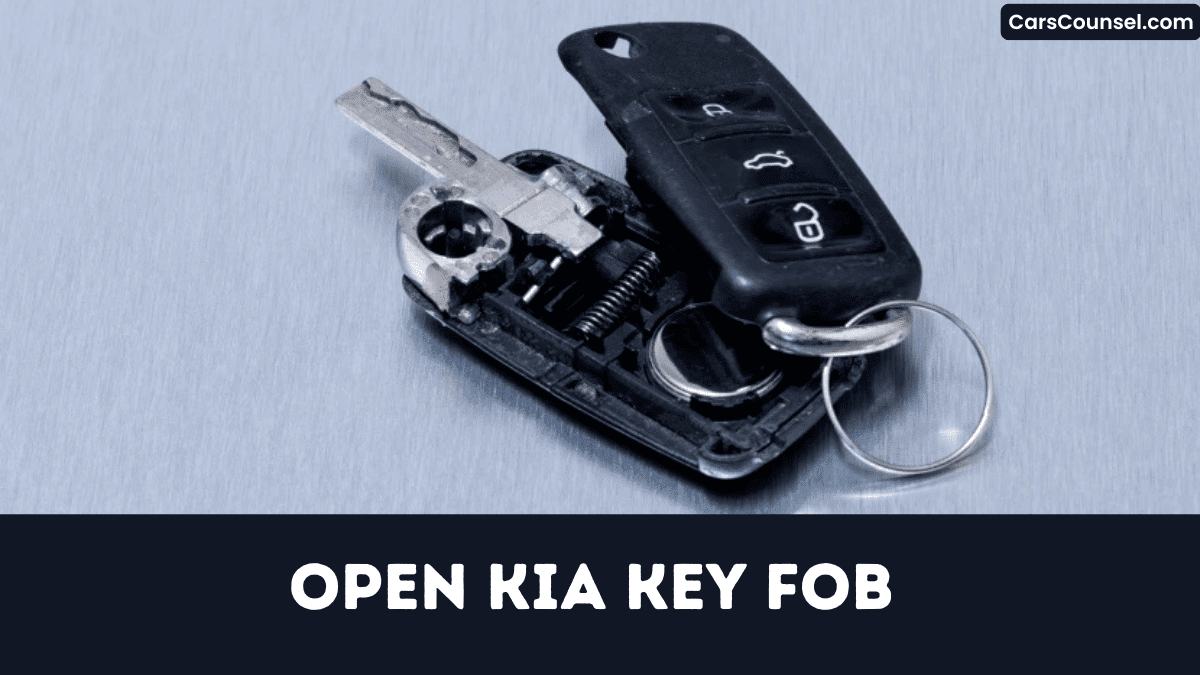
When you’ve to split the Kia key fob case, grab a tiny flat‑head screwdriver and a plastic pry tool and work them into the seam with steady, controlled pressure. Wear protective gloves and line the work surface with soft padding to prevent accidental damage. Apply the screwdriver at the lower joint, twist gently, then insert the pry tool to pry opposite sides apart, watching for cracked plastic that could expose internal circuitry.
| Tool | Position | Risk |
|---|---|---|
| Screwdriver | Lower seam | Clip fracture |
| Pry tool | Upper seam | Plastic stress |
| Finger | Edge | Pinch injury |
Proceed quickly; lingering raises failure risk to you immediately.
Remove the Dead Battery From Your Kia Key Fob
If you need to replace the dead battery, first press the lock button for five seconds to discharge the fob and reduce short‑circuit risk.
Then, using a non‑magnetic pry tool, gently separate the halves, exposing the CR2032 cell.
Inspect the contacts for corrosion; any residue can short the circuit and damage the fob’s electronics.
Inspect contacts for corrosion; residue may short the circuit and damage the fob’s electronics.
Remove the old battery carefully to avoid puncturing it, which could compromise battery lifespan and create a fire hazard.
Finally, place the spent cell in a proper recycling disposal container.
- Check correct polarity.
- Avoid metal contact.
- Place in insulated bag.
- Use authorized recycling service immediately.
Insert a New CR2032 Battery Into Your Kia Key Fob
You’ve already cleared out the old cell, so place the new CR2032 battery into the compartment with the plus sign matching the positive contact.
Perform a polarity check before closing; a reversed battery can short the circuit, corrupt the transceiver, and expose you to lock‑out threats.
Verify the voltage rating is 3 V; any deviation compromises signal integrity and may trigger immobilizer failure.
| Step | Action | Risk |
|---|---|---|
| Insert | Align + to contact | Reverse polarity |
| Check | Confirm 3 V | Low voltage |
| Seal | Snap cover | Loose fit |
Secure the fob tightly; any gap invites moisture intrusion, which can corrode contacts and disable remote functions.
Re‑snap the Fob and Verify Alignment
One critical step after installing the new battery is to re‑snap the fob housing tightly and confirm the halves align perfectly.
Apply snap tension to prevent gaps that let moisture or impact damage the circuitry.
Perform an alignment check before sealing; misalignment weakens the RF antenna and may cause lock‑out.
Follow these actions precisely:
- Press halves together until you hear a solid click.
- Run a fingertip along the seam to confirm no offset.
- Inspect interior for debris that could shift under snap tension.
- Rotate the fob 360° to verify the housing stays rigid and aligned.
Test the Remote Functionality After Reassembly
After you reassemble the fob, you’ll immediately test its remote functions to confirm that the RF signal, button actuation, and LED feedback operate within spec; a weak click or missed lock command signals misalignment or internal damage that could compromise vehicle security.
Press each button and verify the LED flashes brightly; note the button response time and confirm the lock, release, and panic commands reach the vehicle from at least five meters.
Press each button, ensure bright LED flash, check response time, and verify lock, release, panic commands work from five meters.
Record the signal range; if it falls below spec, the antenna or solder joint likely failed, exposing your car to unauthorized entry.
Replace damaged components immediately now.
If Your Kia Key Fob Still Won’t Work: Next‑Step Troubleshooting
Why does your Kia key fob still refuse to communicate after reassembly?
You’ve likely introduced a fault that blocks the radio link, corrupts the micro‑controller, or exposed the unit to signal interference.
Verify battery polarity, re‑solder loose connections, and confirm the antenna coil aligns with the housing.
If those checks fail, a programming reset may be required to re‑establish encrypted communication with the vehicle.
- Inspect solder joints for cold bridges.
- Measure battery voltage under load.
- Scan for nearby RF sources causing signal interference.
- Perform a dealership‑grade programming reset using OBD‑II tools.
Proceed only after verification.
How to Open Key Fobs by Brand: Hidden Key Release, Battery Type & Case Separation
| Toyota Key Fob | Honda Key Fob | Hyundai Key Fob |
| Chevy Key Fob | Ford Key Fob | Jeep Key Fob |
| Subaru Key Fob | Mercedes Key Fob | |
| Audi Key Fob | Volvo Key Fob | VW Key Fob |
Frequently Asked Questions
Can a Kia Key Fob Be Reprogrammed After Battery Replacement?
You’re able to reprogram the fob after battery replacement; DIY reprogramming restores remote sync, preventing lockout threats. Follow the dealer’s timing protocol, verify signal integrity, and test all functions before driving in various conditions today.
Does a Damaged Key Fob Affect My Car’s Immobilizer System?
Yes, a damaged key fob can disrupt your immobilizer, causing signal interference and potentially triggering a security breach; you’ll lose remote access, risk lockout, immediately expose the vehicle to unauthorized entry attempts systematically dangerously today.
Are Aftermarket Key Fobs Compatible With All Kia Models?
No, aftermarket key fobs aren’t universally compatible with all Kia models; you must verify model compatibility first, or you’ll immediately expose your vehicle to signal failures, security breaches, and potential warranty impact and costly repairs.
How Long Does a CR2032 Battery Typically Last in a Kia Fob?
Think of the battery as a ticking heart: your CR2032 delivers roughly two to three years of battery lifespan, but as signal strength wanes, you’re risking lockouts—replace it before failure threatens access your vehicle’s security.
Can I Program a Spare Key Fob Without a Dealer Visit?
Yes, you’ll program a spare fob yourself; DIY programming via Home reprogram works on most Kia models, but improper steps expose you to lockout threats, so follow the exact procedure meticulously thoroughly and verify again.
Conclusion
Replace the battery, reseal the case, and test the fob; if any step fails, you risk a dead remote, a compromised waterproof seal, or permanent circuit damage. You’ll verify polarity, you’ll align the halves, you’ll press the lock button to discharge. You’ll avoid forcing the split, you’ll prevent cracked plastic, you’ll guarantee reliable operation. Follow each precise action, or the key fob becomes a security liability and could jeopardize vehicle access in emergencies for you.

